

Day 5: Database & Containerization - The Foundation of Stateful Distributed Systems
The Real Problem: Why Netflix Can't Just Use SQLite
Imagine you're building the next Netflix. Your app works perfectly on your laptop with a simple SQLite database storing user preferences and viewing history. But the moment you deploy to production with millions of users, everything breaks. Why? Because distributed systems need databases that can scale across multiple machines while maintaining consistency - something your laptop's single SQLite file simply cannot do.
This is exactly why companies like Netflix, Uber, and Instagram architect their data layer using containerized PostgreSQL clusters with Redis caching layers. Today, we'll build this foundation for your distributed log processing system.
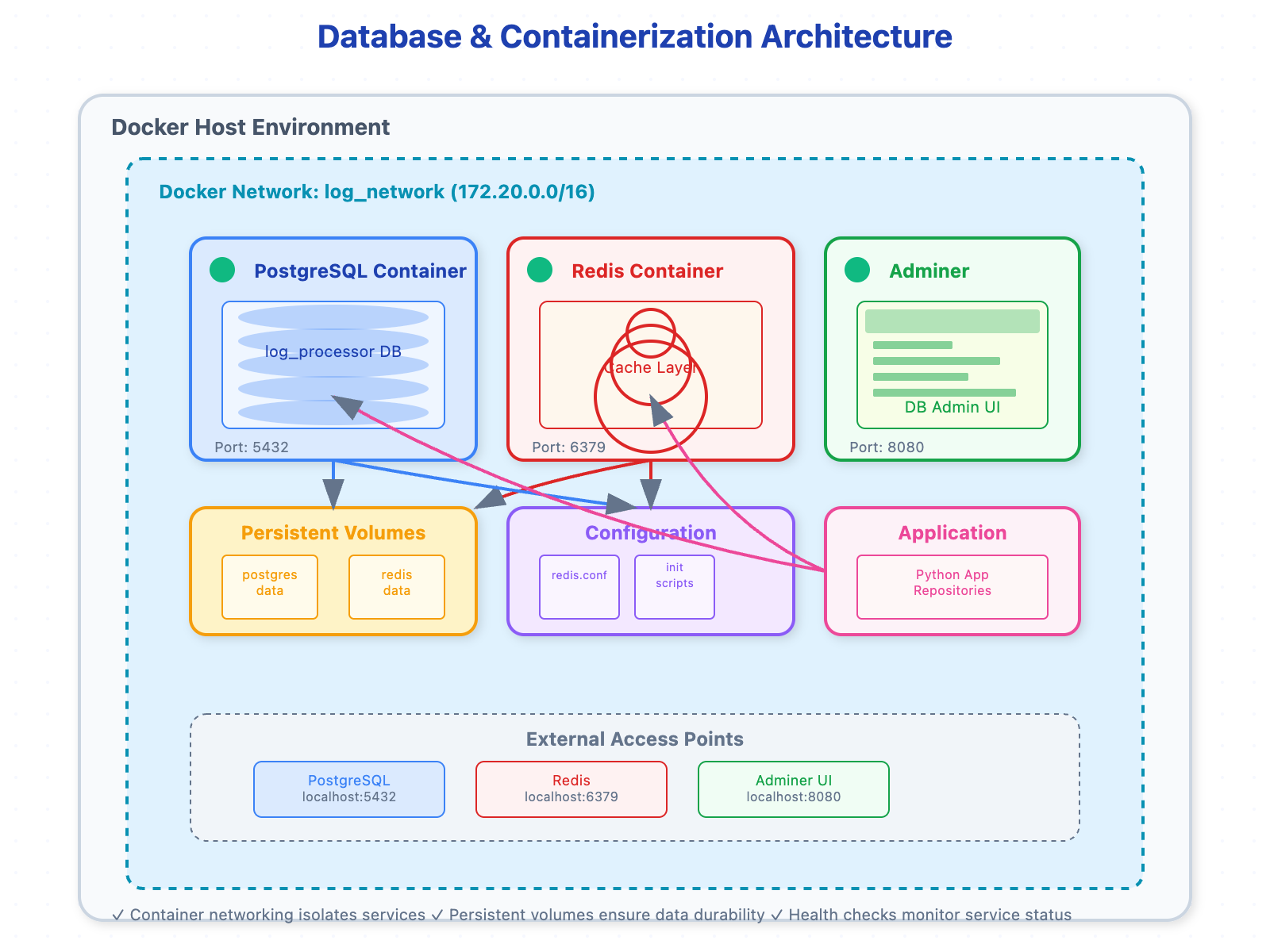
The Architecture: PostgreSQL + Redis + Docker Compose
In a distributed log processing system, you need two types of data storage:
PostgreSQL serves as your system of record - storing structured data like user accounts, log metadata, processing rules, and analytics results. Think of it as your system's long-term memory.
Redis acts as your high-speed cache - storing frequently accessed data, session information, and temporary processing states. It's like your system's working memory.
Docker Compose orchestrates both services, ensuring they can communicate securely and restart reliably - critical for production systems that must handle failures gracefully.
Why This Matters in Real Systems
At Slack, when a user sends a message, the system immediately caches the conversation in Redis for instant retrieval while asynchronously persisting the message to PostgreSQL for durability. Without this dual-layer approach, either your users experience slow loading times, or you risk data loss during server crashes.
The containerization layer prevents the infamous "it works on my machine" problem. When your log processing system scales to handle millions of events per second, you need identical environments across development, staging, and production.
Component Architecture Deep Dive
PostgreSQL: The Persistent Data Layer
PostgreSQL acts as your distributed system's source of truth. In our log processing system, it stores:
Log schemas and parsing rules - How to interpret different log formats
User authentication and authorization - Who can access which logs
Processed analytics - Aggregated insights and reports
System configuration - Processing pipelines and alert rules
The key insight: PostgreSQL's ACID properties ensure that even when your system processes thousands of log entries simultaneously, data integrity remains intact.
Redis: The Speed Layer
Redis operates as your system's high-performance cache, handling:
Session management - User login states and preferences
Real-time counters - Live metrics like error rates and throughput
Temporary processing queues - Batching log entries for efficient processing
Frequently accessed data - Recently queried logs and dashboards
Container Orchestration
Docker Compose creates an isolated network where PostgreSQL and Redis communicate securely. This networking layer becomes crucial when scaling - you can add more Redis instances for caching or PostgreSQL replicas for read scaling without changing application code.
The Production Reality
Here's what most tutorials won't tell you: In production systems like those at Airbnb or Spotify, the database initialization process is critical. A single misconfigured index can bring down your entire log processing pipeline. That's why we're implementing proper database seeding and initialization scripts - they're not just convenience tools, they're production necessities.
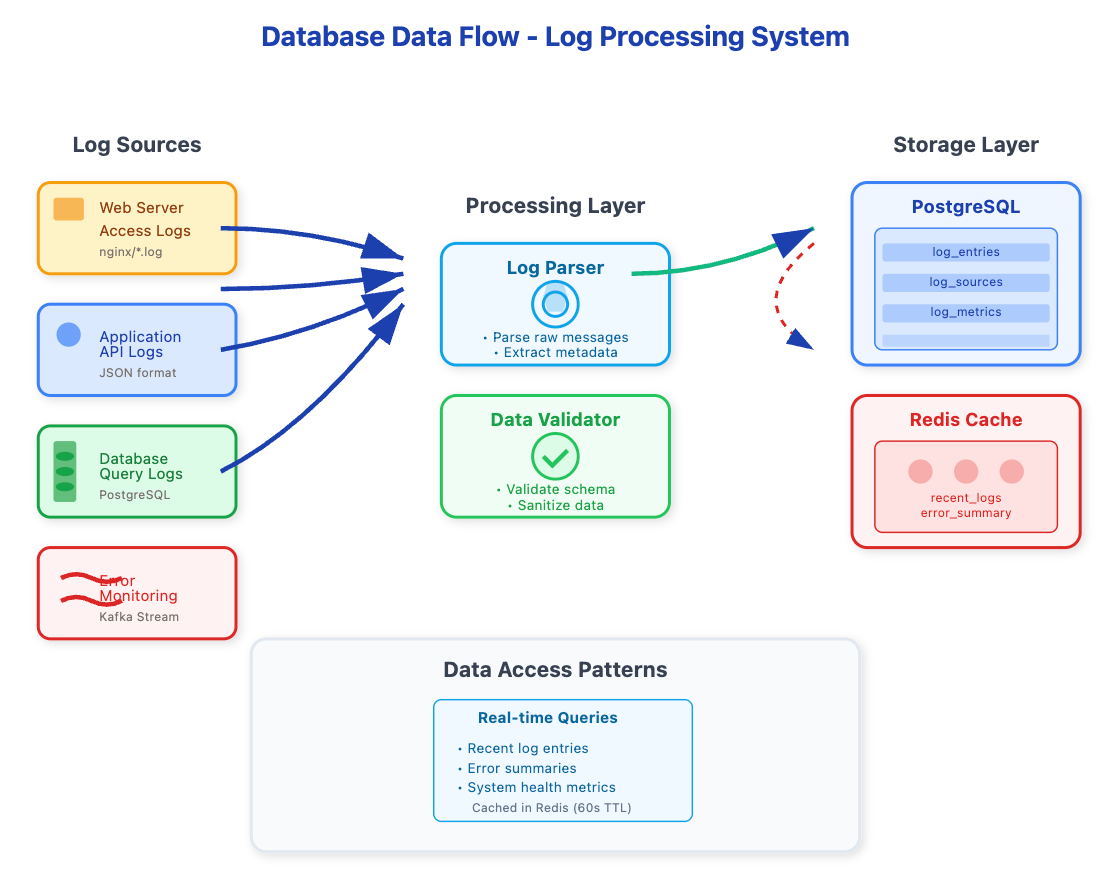
Data Flow in Your Log Processing System
Log ingestion hits Redis first for deduplication and rate limiting
Processing rules are fetched from PostgreSQL and cached in Redis
Processed logs are written to PostgreSQL with Redis caching recent results
User queries check Redis first, falling back to PostgreSQL for historical data
Hands-On Implementation Strategy
We'll build this incrementally:
Container Foundation - Docker Compose configuration with proper networking
Database Initialization - Schema creation and seed data loading
Connection Management - Robust database connections with connection pooling
Caching Layer - Redis integration with TTL policies
Testing Infrastructure - Automated verification of database operations
Success Metrics
By the end of this lesson, you'll have:
A containerized database stack that survives container restarts
Proper database initialization that creates consistent environments
Redis caching that demonstrably improves query performance
Network configuration that enables secure inter-container communication
Seed data that provides realistic testing scenarios
The Hidden Complexity
What makes this challenging isn't the individual components - PostgreSQL and Redis are well-documented. The complexity lies in their interaction within a distributed system context. When your log processing system scales to handle gigabytes of data per hour, you need to understand connection pooling, cache invalidation strategies, and database replica lag.
Production Insights
Companies like Discord handle billions of messages by implementing a similar architecture, but with sophisticated sharding strategies and read replicas. The foundation you're building today - containerized PostgreSQL with Redis caching - is identical to what powers systems processing terabytes of logs daily.
Your containerized database setup isn't just about development convenience; it's about building systems that can scale from prototype to production without architectural rewrites.
Hands-On Project Implementation Guide
Database & Containerization for Distributed Log Processing System
Source code repository :
https://github.com/sysdr/infrawatch-fullstack-p/tree/main/day5
Project Overview
Build a containerized database infrastructure using PostgreSQL and Redis that serves as the foundation for a distributed log processing system.
Learning Objectives
Implement PostgreSQL with proper schema design for log processing
Configure Redis for session management and caching
Set up Docker Compose for container orchestration
Create database initialization and seeding scripts
Configure secure container networking
Project Structure
├── distributed-systems-day5
│   ├── config
│   │   └── redis.conf
│   ├── database
│   │   ├── migrations
│   │   │   └── 001_create_tables.sql
│   │   ├── scripts
│   │   └── seeds
│   │       └── 002_seed_data.sql
│   ├── docker
│   ├── docker-compose.yml
│   ├── logs
│   ├── requirements.txt
│   ├── src
│   │   ├── models
│   │   │   └── database.py
│   │   ├── repositories
│   │   │   └── log_repository.py
│   │   └── services
│   └── tests
│       ├── integration
│       ├── test_database.py
│       └── unit
└── setup.sh
Component Implementation
1. Docker Compose Configuration
File: docker-compose.yml
3. Python Database Connection Manager
File: src/models/database.py
4. Redis Caching Layer
5. Database Seeding Script
Integration Testing Framework
File: test_database.py
"""Test database functionality."""
import pytest
import pytest_asyncio
import asyncio
import asyncpg
import redis.asyncio as redis
import uuid
import json
from src.models.database import DatabaseManager, LogEntry
from src.repositories.log_repository import LogRepository

@pytest_asyncio.fixture
async def db_manager():
    """Create database manager for testing."""
    manager = DatabaseManager()
    await manager.initialize()
    try:
        yield manager
    finally:
        await manager.close()

@pytest.mark.asyncio
async def test_database_connection(db_manager):
    """Test database connections."""
    assert db_manager.pg_pool is not None
    assert db_manager.redis_client is not None

    # Test PostgreSQL
    async with db_manager.pg_pool.acquire() as conn:
        result = await conn.fetchval("SELECT 1")
        assert result == 1

    # Test Redis
    await db_manager.redis_client.set("test_key", "test_value")
    value = await db_manager.redis_client.get("test_key")
    assert value == "test_value"

@pytest.mark.asyncio
async def test_log_repository(db_manager):
    """Test log repository operations."""
    repo = LogRepository(db_manager.pg_pool, db_manager.redis_client)

    # Create a test source first
    async with db_manager.pg_pool.acquire() as conn:
        source_id = await conn.fetchval(
            """
            INSERT INTO log_sources (name, source_type, configuration)
            VALUES ($1, $2, $3)
            RETURNING id
            """,
            "Test Source",
            "test",
            json.dumps({"test": "config"})
        )

    # Create test log entry
    log_entry = LogEntry(
        "Test log message",
        str(source_id),
        "INFO"
    )

    # Save to database
    log_id = await repo.save_log_entry(log_entry.to_dict())
    assert log_id is not None

    # Retrieve recent logs
    logs = await repo.get_recent_logs(limit=10)
    assert len(logs) > 0
    assert any(log['raw_message'] == "Test log message" for log in logs)
Performance Monitoring
The implementation includes monitoring hooks for tracking:
Database connection pool usage
Redis cache hit/miss ratios
Query execution times
Container resource utilization
Production Considerations
Connection Pooling: Implemented to handle concurrent requests efficiently
Cache Invalidation: TTL-based with manual invalidation support
Health Checks: Container-level health monitoring
Data Persistence: Proper volume mounting for data durability
Security: Environment-based secrets management
This implementation provides a production-ready foundation that can scale from development to handling millions of log entries per day.
Build, Test, Verify Guide
Database & Containerization Setup
Prerequisites
Docker and Docker Compose installed
Python 3.9+ installed
Git installed
Part 1: Manual Setup (Without Docker)
Step 1: Install Dependencies
# Create project directory
mkdir distributed-systems-day5 && cd distributed-systems-day5

# Create virtual environment
python -m venv venv
source venv/bin/activate  # On Windows: venv\Scripts\activate

# Install Python dependencies
pip install psycopg2-binary redis faker pytest python-dotenv
Expected Output:
Successfully installed psycopg2-binary-2.9.7 redis-4.6.0 faker-19.6.2 pytest-7.4.2 python-dotenv-1.0.0Step 2: Install PostgreSQL and Redis Locally
# Ubuntu/Debian
sudo apt update
sudo apt install postgresql postgresql-contrib redis-server

# macOS
brew install postgresql redis

# Start services
sudo systemctl start postgresql redis-server  # Linux
brew services start postgresql redis  # macOS
Expected Output:
postgresql.service and redis.service started successfully
Step 3: Configure PostgreSQL
# Create database and user
sudo -u postgres createdb log_processor
sudo -u postgres createuser --interactive log_user

# Set password
sudo -u postgres psql -c "ALTER USER log_user PASSWORD 'secure_password';"
sudo -u postgres psql -c "GRANT ALL PRIVILEGES ON DATABASE log_processor TO log_user;"
Expected Output:
CREATE DATABASE
CREATE ROLE
ALTER ROLE
GRANT
Step 4: Test Connections
# Test PostgreSQL
psql -h localhost -U log_user -d log_processor -c "SELECT version();"

# Test Redis
redis-cli ping
Expected Output:
PostgreSQL 15.4 on x86_64-pc-linux-gnu...
PONG
Part 2: Docker Setup
Step 1: Create Environment File
# Create .env file
cat > .env << EOF
DB_USER=log_user
DB_PASSWORD=secure_password_123
DB_NAME=log_processor
DB_HOST=postgres
REDIS_HOST=redis
REDIS_PORT=6379
DB_PORT=5432
EOF
Step 2: Create Docker Compose Configuration
# Create docker-compose.yml
cat > docker-compose.yml << 'EOF'
version: '3.8'

services:
  postgres:
    image: postgres:15-alpine
    container_name: log_processor_db
    environment:
      POSTGRES_DB: log_processor
      POSTGRES_USER: devuser
      POSTGRES_PASSWORD: devpass
    ports:
      - "5432:5432"
    volumes:
      - postgres_data:/var/lib/postgresql/data
      - ./database/migrations:/docker-entrypoint-initdb.d/migrations
      - ./database/seeds:/docker-entrypoint-initdb.d/seeds
    networks:
      - log_network
    healthcheck:
      test: ["CMD-SHELL", "pg_isready -U devuser -d log_processor"]
      interval: 10s
      timeout: 5s
      retries: 5

  redis:
    image: redis:7-alpine
    container_name: log_processor_cache
    ports:
      - "6379:6379"
    volumes:
      - redis_data:/data
      - ./config/redis.conf:/usr/local/etc/redis/redis.conf
    command: redis-server /usr/local/etc/redis/redis.conf
    networks:
      - log_network
    healthcheck:
      test: ["CMD", "redis-cli", "ping"]
      interval: 10s
      timeout: 5s
      retries: 5

  adminer:
    image: adminer:4.8.1
    container_name: log_processor_admin
    ports:
      - "8080:8080"
    networks:
      - log_network
    depends_on:
      - postgres

volumes:
  postgres_data:
    driver: local
  redis_data:
    driver: local

networks:
  log_network:
    driver: bridge
    ipam:
      config:
        - subnet: 172.20.0.0/16
EOF
Step 3: Create Database Initialization Scripts
# Create directory structure
mkdir -p database/init redis scripts src/database src/cache tests

# Create schema initialization
cat > database/init/01-create-schema.sql << 'EOF'
-- Create extensions
CREATE EXTENSION IF NOT EXISTS "uuid-ossp";
CREATE EXTENSION IF NOT EXISTS "pg_stat_statements";

-- Create custom types
CREATE TYPE log_level AS ENUM ('DEBUG', 'INFO', 'WARN', 'ERROR', 'FATAL');
CREATE TYPE user_role AS ENUM ('admin', 'analyst', 'viewer');
EOF

# Create tables
cat > database/init/02-create-tables.sql << 'EOF'
-- Log sources table
CREATE TABLE log_sources (
    id SERIAL PRIMARY KEY,
    name VARCHAR(100) NOT NULL UNIQUE,
    description TEXT,
    format_type VARCHAR(50) NOT NULL,
    parsing_rules JSONB,
    created_at TIMESTAMP DEFAULT CURRENT_TIMESTAMP,
    updated_at TIMESTAMP DEFAULT CURRENT_TIMESTAMP
);

-- Users table
CREATE TABLE users (
    id SERIAL PRIMARY KEY,
    username VARCHAR(50) NOT NULL UNIQUE,
    email VARCHAR(100) NOT NULL UNIQUE,
    password_hash VARCHAR(255) NOT NULL,
    role user_role DEFAULT 'viewer',
    created_at TIMESTAMP DEFAULT CURRENT_TIMESTAMP,
    last_login TIMESTAMP
);

-- Log entries table (partitioned)
CREATE TABLE log_entries (
    id BIGSERIAL,
    source_id INTEGER REFERENCES log_sources(id),
    timestamp TIMESTAMP NOT NULL,
    level log_level NOT NULL,
    message TEXT NOT NULL,
    metadata JSONB,
    processed_at TIMESTAMP DEFAULT CURRENT_TIMESTAMP,
    PRIMARY KEY (id, timestamp)
) PARTITION BY RANGE (timestamp);

-- Create indexes
CREATE INDEX idx_log_entries_timestamp ON log_entries (timestamp);
CREATE INDEX idx_log_entries_level ON log_entries (level);
CREATE INDEX idx_log_entries_source_id ON log_entries (source_id);
CREATE INDEX idx_log_entries_metadata ON log_entries USING GIN (metadata);
EOF

# Create seed data
cat > database/init/03-seed-data.sql << 'EOF'
-- Insert sample log sources
INSERT INTO log_sources (name, description, format_type, parsing_rules) VALUES
('nginx_access', 'Nginx access logs', 'nginx', '{"timestamp_format": "%d/%b/%Y:%H:%M:%S", "separator": " "}'),
('app_error', 'Application error logs', 'json', '{"timestamp_field": "timestamp", "level_field": "level"}'),
('db_slow_query', 'Database slow queries', 'structured', '{"duration_threshold": 1000, "format": "sql"}');

-- Insert sample users
INSERT INTO users (username, email, password_hash, role) VALUES
('admin', 'admin@logprocessor.com', '$2b$12$LQv3c1yqBWVHxkd0LHAkCOYz6TtxMQJqhN8/LewMxttBgME6.KGg6', 'admin'),
('analyst', 'analyst@logprocessor.com', '$2b$12$LQv3c1yqBWVHxkd0LHAkCOYz6TtxMQJqhN8/LewMxttBgME6.KGg6', 'analyst'),
('viewer', 'viewer@logprocessor.com', '$2b$12$LQv3c1yqBWVHxkd0LHAkCOYz6TtxMQJqhN8/LewMxttBgME6.KGg6', 'viewer');

-- Create current month partition
CREATE TABLE log_entries_current PARTITION OF log_entries
FOR VALUES FROM (CURRENT_DATE - INTERVAL '1 month') TO (CURRENT_DATE + INTERVAL '1 month');
EOF
Step 4: Create Redis Configuration
cat > redis/redis.conf << 'EOF'
# Basic configuration
bind 0.0.0.0
port 6379
timeout 300
tcp-keepalive 60

# Memory management
maxmemory 256mb
maxmemory-policy allkeys-lru

# Persistence
save 900 1
save 300 10
save 60 10000
appendonly yes
appendfsync everysec

# Security
# requirepass your_redis_password_here

# Logging
loglevel notice
EOF
Step 5: Start Containers
# Start services
docker-compose up -d

# Check status
docker-compose ps
Expected Output:
NAME                    IMAGE              COMMAND                  SERVICE    CREATED         STATUS                   PORTS
log_processor_cache     redis:7-alpine     "docker-entrypoint.s…"   redis      2 minutes ago   Up 2 minutes (healthy)   0.0.0.0:6379->6379/tcp
log_processor_db        postgres:15-alpine "docker-entrypoint.s…"   postgres   2 minutes ago   Up 2 minutes (healthy)   0.0.0.0:5432->5432/tcp
Step 6: Verify Database Setup
# Check PostgreSQL
docker exec log_processor_db psql -U log_user -d log_processor -c "\dt"

# Check Redis
docker exec log_processor_cache redis-cli ping
Expected Output:
List of relations
 Schema |      Name       | Type  |  Owner
--------+-----------------+-------+----------
 public | log_entries     | table | log_user
 public | log_sources     | table | log_user
 public | users           | table | log_user

PONG
Part 3: Testing Framework
Step 1: Create Python Database Connection Test
cat > tests/test_postgres.py << 'EOF'
import pytest
import psycopg2
import os
from dotenv import load_dotenv

load_dotenv()

@pytest.fixture
def db_connection():
    conn = psycopg2.connect(
        host=os.getenv('DB_HOST', 'localhost'),
        database=os.getenv('DB_NAME', 'log_processor'),
        user=os.getenv('DB_USER'),
        password=os.getenv('DB_PASSWORD'),
        port=int(os.getenv('DB_PORT', 5432))
    )
    yield conn
    conn.close()

def test_database_connection(db_connection):
    cursor = db_connection.cursor()
    cursor.execute("SELECT 1")
    result = cursor.fetchone()
    assert result[0] == 1

def test_log_sources_table(db_connection):
    cursor = db_connection.cursor()
    cursor.execute("SELECT COUNT(*) FROM log_sources")
    count = cursor.fetchone()[0]
    assert count >= 3  # We seeded 3 sources

def test_users_table(db_connection):
    cursor = db_connection.cursor()
    cursor.execute("SELECT username FROM users WHERE role = 'admin'")
    admin_users = cursor.fetchall()
    assert len(admin_users) >= 1
EOF

# Create Redis test
cat > tests/test_redis.py << 'EOF'
import pytest
import redis
import os
from dotenv import load_dotenv

load_dotenv()

@pytest.fixture
def redis_client():
    client = redis.Redis(
        host=os.getenv('REDIS_HOST', 'localhost'),
        port=int(os.getenv('REDIS_PORT', 6379)),
        db=0,
        decode_responses=True
    )
    yield client
    client.flushdb()

def test_redis_connection(redis_client):
    assert redis_client.ping() == True

def test_redis_set_get(redis_client):
    redis_client.set('test_key', 'test_value')
    assert redis_client.get('test_key') == 'test_value'

def test_redis_expiration(redis_client):
    redis_client.setex('temp_key', 1, 'temp_value')
    assert redis_client.get('temp_key') == 'temp_value'
    # Note: In real test, you'd wait and check expiration
EOF
Step 2: Run Tests
# Install test dependencies
pip install pytest python-dotenv

# Run PostgreSQL tests
pytest tests/test_postgres.py -v

# Run Redis tests
pytest tests/test_redis.py -v
Expected Output:
tests/test_postgres.py::test_database_connection PASSED
tests/test_postgres.py::test_log_sources_table PASSED
tests/test_postgres.py::test_users_table PASSED

tests/test_redis.py::test
What's Next
Tomorrow, we'll build comprehensive testing frameworks that validate your database interactions. You'll learn how to create reliable test data, mock database connections, and ensure your distributed system components work correctly in isolation and integration.
Remember: databases are the source of truth in distributed systems. Master this foundation, and you'll understand why senior engineers obsess over data consistency, transaction isolation, and backup strategies.
The difference between junior and senior engineers often comes down to database design decisions made early in a project's lifecycle. Today's lesson gives you the foundational knowledge to make those decisions confidently.
Assignment: Multi-Environment Database Setup
Create a three-environment database setup (development, testing, production) using Docker Compose profiles. Each environment should have:
Different PostgreSQL configurations optimized for its use case
Environment-specific Redis configurations
Separate initialization scripts with appropriate seed data
Network isolation between environments
Hint: Use Docker Compose profiles and environment variable substitution to manage configuration differences while sharing the same compose file structure.