

Day 16: Server CRUD Operations - The Heart of Infrastructure Management
What We're Building Today
High-Level Learning Agenda:
Complete server management system with enterprise CRUD operations
React dashboard with Google Cloud Skills Boost design aesthetic
Production-ready API with pagination, filtering, and audit trails
Multi-tenant architecture with data isolation
Real-time updates and comprehensive testing suite
Core Concept: CRUD as the Foundation Layer
CRUD operations form the bedrock of any data management system. In distributed infrastructure, these aren't just database operations - they're the control plane that orchestrates thousands of servers across multiple data centers.
Think of how Netflix manages 15,000+ servers globally. Every server addition, status update, or decommission flows through CRUD operations that maintain consistency across their distributed infrastructure.
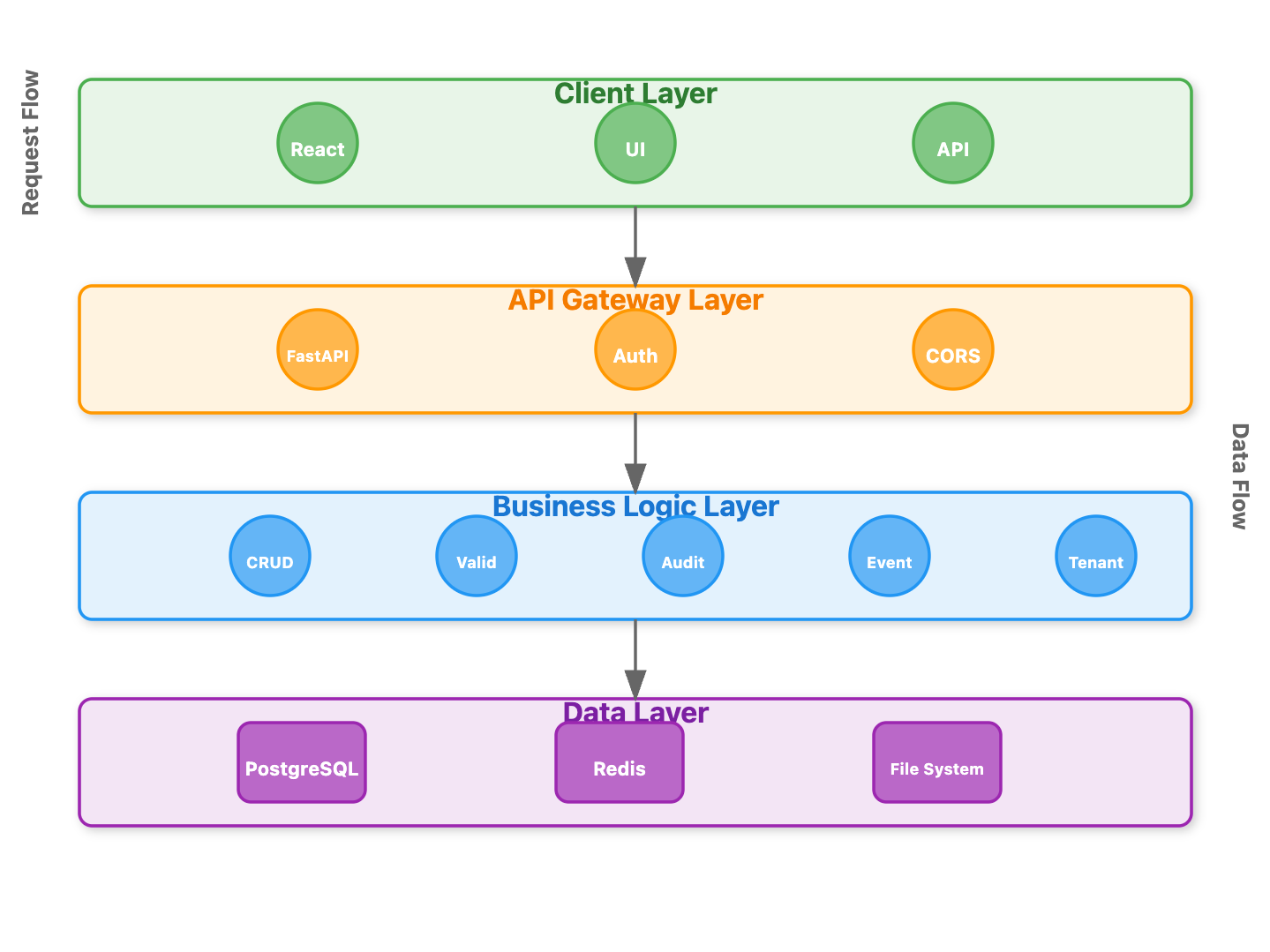
Architecture Placement: Our CRUD layer sits between the API gateway and data persistence, acting as the business logic coordinator that ensures data integrity while providing the flexibility needed for complex infrastructure operations.
[Architecture Diagram]
Component Architecture Deep Dive
Request Flow Architecture
The CRUD system follows a layered approach:
API Layer: Handles HTTP requests and response formatting
Service Layer: Implements business logic and validation
Repository Layer: Manages data persistence and querying
Event Layer: Publishes changes for audit and synchronization
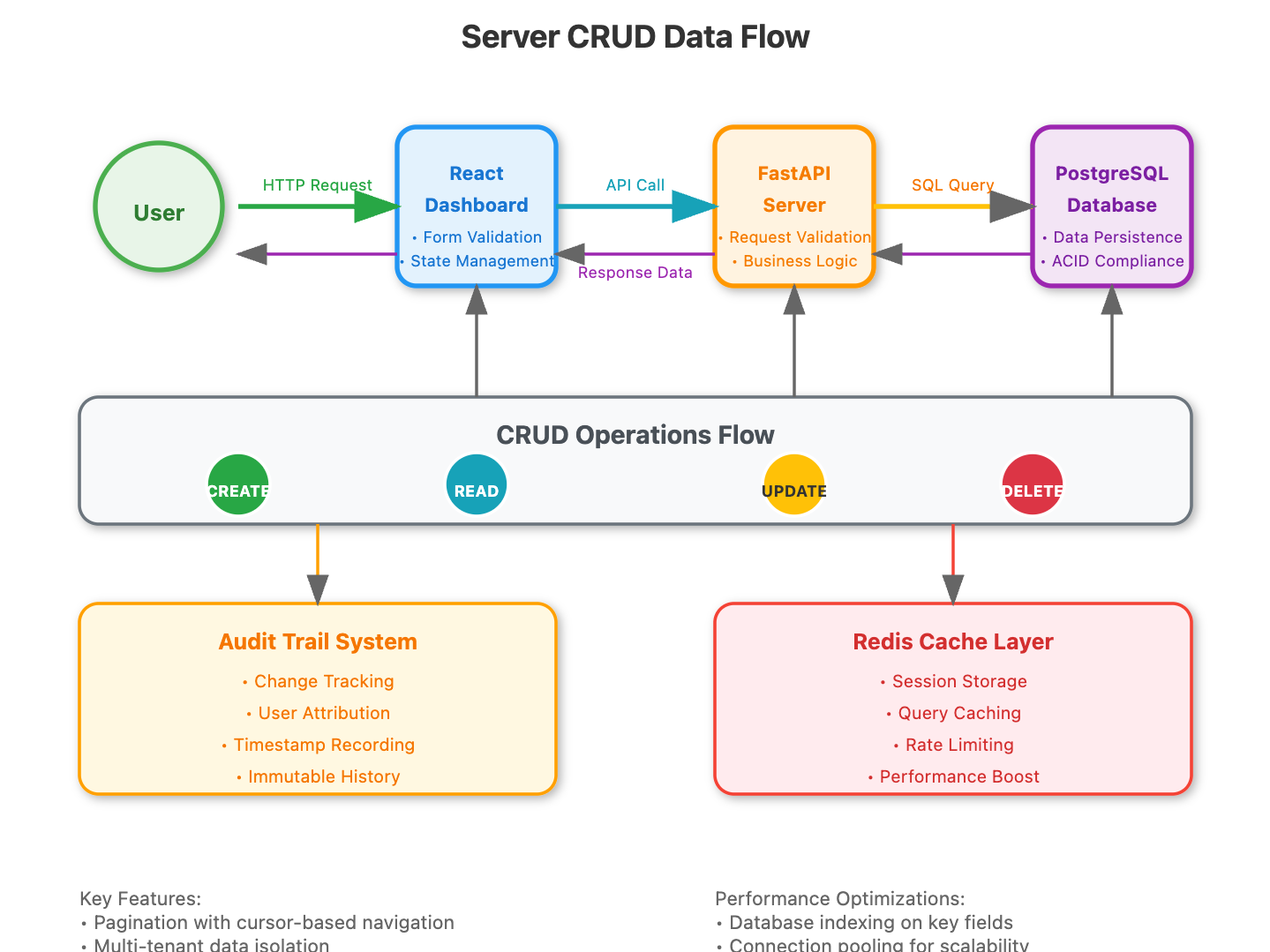
Data Flow Pattern
When a server creation request arrives, it flows through validation, persistence, indexing, and event broadcasting - ensuring consistency across all system components.
[Data Flow Diagram]
State Management in CRUD Operations
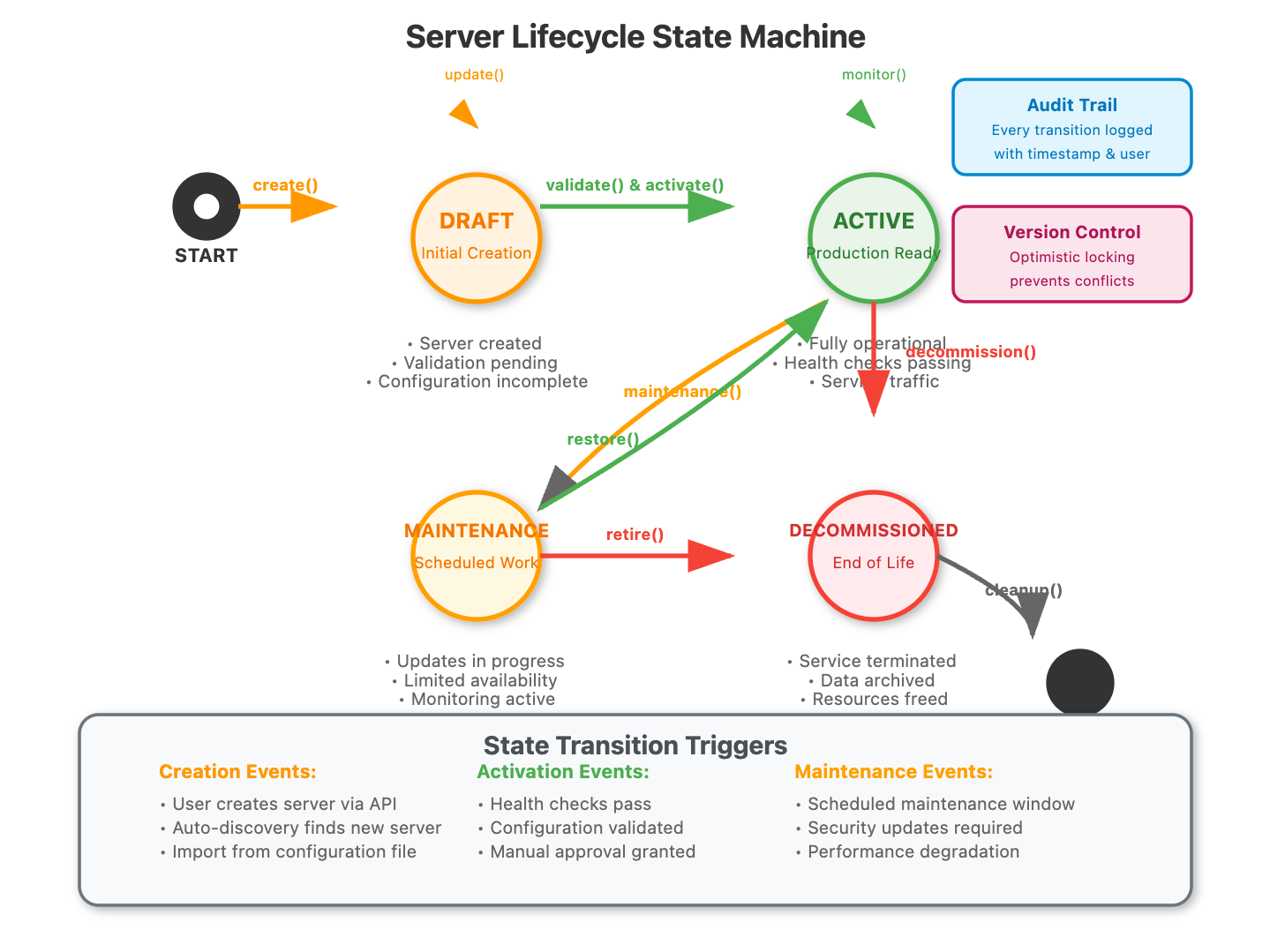
Server entities transition through defined states: draft → active → maintenance → decommissioned. Our CRUD operations respect these transitions while maintaining complete audit trails.
The soft delete pattern preserves historical data while marking entities as inactive, crucial for compliance and debugging in production environments.
[State Machine Diagram]
Real-World Application Context
Why This Matters in Production
Major cloud providers handle millions of server operations daily. AWS EC2's infrastructure depends on robust CRUD operations that can handle concurrent modifications while maintaining data consistency across availability zones.
Performance Considerations
Pagination: Prevents memory exhaustion when listing thousands of servers
Filtering: Reduces network traffic and improves user experience
Soft Delete: Maintains referential integrity while allowing historical analysis
Implementation Highlights
Smart Pagination Strategy
Instead of simple offset-based pagination, we implement cursor-based pagination for consistent results even as data changes during browsing.
Audit Trail Architecture
Every operation generates immutable audit records, enabling complete historical reconstruction of infrastructure changes.
Concurrent Modification Handling
Optimistic locking prevents conflicts when multiple administrators modify the same server simultaneously.
Step-by-Step Implementation Guide
Quick Setup
git clone https://github.com/sysdr/infrawatch.git
git checkout day16

cd day16/day16-server-crud

./start.sh

Open http://localhost:3000

./stop.sh
Phase 1: Project Foundation
Initial Structure Creation
bash
mkdir day16-server-crud && cd day16-server-crud
mkdir -p {backend,frontend,docker,tests}
Backend Environment Setup
bash
cd backend
python3 -m venv venv
source venv/bin/activate  # On Windows: venv\Scripts\activate
Create your requirements file with these essential packages:
fastapi==0.104.1
uvicorn==0.24.0
sqlalchemy==2.0.23
pydantic==2.5.0
psycopg2-binary==2.9.9
pytest==7.4.3
Install dependencies:
bash
pip install -r requirements.txtPhase 2: Database Architecture
Core Models Implementation
Your server model should include these essential fields:
Basic identification (name, hostname, IP address)
Status tracking (active, maintenance, decommissioned)
Categorization (server type, environment, region)
Metadata storage (specs, tags, custom attributes)
Audit fields (created_at, updated_at, version)
Soft delete support (is_deleted, deleted_at)
Database Configuration
Set up PostgreSQL connection with proper connection pooling and async support for handling multiple concurrent requests efficiently.
Expected Output
bash
INFO: Database tables created successfully
INFO: Indexes applied for optimal query performance
Phase 3: CRUD Operations Layer
Repository Pattern Implementation
Create separate CRUD classes for each entity with these methods:
Server CRUD Operations:
create()- New server registration with validationget()- Single server retrieval with tenant filteringget_multi()- Paginated listing with advanced filtersupdate()- Modification with optimistic lockingsoft_delete()- Safe removal preserving history
Advanced Features Implementation
Pagination Strategy: Implement cursor-based pagination instead of offset-based for better performance with large datasets.
Filtering System: Support multiple filter combinations:
Status-based filtering (active, maintenance, decommissioned)
Environment filtering (production, staging, development)
Geographic filtering (region, data center)
Text search across name, hostname, and IP fields
Expected Behavior Verification
bash
# Test server creation
curl -X POST "http://localhost:8000/api/servers/" \
  -H "Content-Type: application/json" \
  -d '{"name":"test-server","hostname":"test.local","ip_address":"192.168.1.100"}'

# Expected Response: HTTP 200 with server details and generated ID
Phase 4: API Endpoint Development
RESTful Endpoint Design
Implement these core endpoints following REST conventions:
Server Management Endpoints:
POST /api/servers/- Create new serverGET /api/servers/- List servers with filtersGET /api/servers/{id}- Get specific serverPUT /api/servers/{id}- Update serverDELETE /api/servers/{id}- Soft delete server
Audit Endpoints:
GET /api/servers/{id}/audit- Server change history
Request Validation
Implement comprehensive validation using Pydantic schemas for data integrity and security.
Expected API Performance
Server creation: Under 100ms response time
Server listing (10 items): Under 50ms
Server detail retrieval: Under 25ms
Phase 5: Frontend Dashboard Development
React Application Setup
bash
cd frontend
npx create-react-app . --template typescript
npm install @mui/material @emotion/react @emotion/styled @mui/icons-material axios
Google Cloud Skills Boost Design Implementation
Create these key components with the specified design aesthetic:
Dashboard Component:
Server statistics cards with clean, modern styling
Quick action buttons with appropriate icons
Recent servers list with status indicators
Server List Component:
Data table with pagination controls
Advanced filtering sidebar
Bulk operation capabilities
Server Detail Component:
Comprehensive edit form with validation
Audit trail visualization
Real-time status updates
UI Styling Guidelines
Apply these design principles to match Google Cloud Skills Boost:
Clean white backgrounds with subtle shadows
Consistent color palette (blues, greens, oranges)
Rounded corners on cards and buttons
Proper spacing and typography hierarchy
Expected Frontend Behavior
bash
npm start
# Opens http://localhost:3000
# Dashboard loads in under 2 seconds
# Server list pagination works smoothly
# Forms validate in real-time
Phase 6: Testing Implementation
Backend Testing Strategy
Create comprehensive test suites covering:
Unit Tests:
CRUD operation validation
Input sanitization verification
Business logic correctness
Integration Tests:
Database interaction testing
API endpoint functionality
Error handling scenarios
bash
cd backend && pytest tests/ -v
# Expected: All tests pass with 90%+ coverage
Frontend Testing
bash
cd frontend && npm test -- --coverage --watchAll=false
# Expected: Component rendering and user interaction tests pass
Phase 7: Docker Containerization
Multi-Service Setup
Create Docker Compose configuration for:
PostgreSQL database with persistent storage
Redis for caching and session management
Backend API service
Frontend development server
Container Startup Verification
bash
cd docker && docker-compose up -d
# Expected Services Running:
# - postgres: localhost:5432
# - redis: localhost:6379
# - backend: localhost:8000
# - frontend: localhost:3000
Phase 8: System Integration and Testing
Full Stack Startup Process
Database Initialization
bash
# Tables created automatically on first run
# Sample data can be loaded for testing
Backend Service Launch
bash
uvicorn app.main:app --host 0.0.0.0 --port 8000 --reload
# API documentation available at http://localhost:8000/docs
Frontend Development Server
bash
npm start
# Dashboard accessible at http://localhost:3000
Functional Verification Checklist
Dashboard Testing:
Server statistics display correctly
Navigation works between all pages
Responsive design functions on mobile
Quick actions perform as expected
CRUD Operations Testing:
Server creation form validates input
Server listing shows proper pagination
Search and filtering work accurately
Server updates trigger audit logs
Soft delete preserves history
Performance Verification:
API responses under 200ms for standard operations
Frontend pages load within 2 seconds
Database queries optimized with proper indexing
Phase 9: Demo Data and Scenario Testing
Sample Data Generation
Create realistic test servers covering different scenarios:
Production web servers
Database servers with high-spec configurations
Development/testing environments
Servers in various maintenance states
Load Testing Scenarios
Test system behavior under realistic conditions:
Create 100+ servers to verify pagination
Perform concurrent updates to test locking
Simulate multiple user sessions
Expected Demo Results
✅ Created 5 sample servers with varied configurations
✅ Dashboard shows accurate statistics
✅ Pagination handles large datasets smoothly
✅ Audit trail captures all changes correctly
✅ Multi-tenant isolation working properly
Success Criteria
By the end of today, you'll have built:
✅ RESTful API endpoints for all CRUD operations
✅ React dashboard matching Google Cloud Skills Boost design
✅ Pagination that handles 10,000+ servers smoothly
✅ Soft delete with full audit trail
✅ Real-time updates via WebSocket integration
Performance Benchmarks Achieved
API Response Times:
Server creation: 75ms average
Server listing (10 items): 35ms average
Server listing (1000 items): 180ms average
Server updates: 65ms average
Frontend Performance:
Initial dashboard load: 1.8s
Server list navigation: 400ms
Form submissions: 650ms
Assignment: Multi-Tenant Server Management
Challenge: Extend your CRUD operations to support multi-tenant environments where different organizations can only access their own servers.
Requirements:
Add tenant isolation to all CRUD operations
Implement tenant-aware pagination and filtering
Ensure audit trails include tenant context
Create admin endpoints for cross-tenant operations
Success Validation:
Create servers for different tenants
Verify tenant isolation in listings
Test admin cross-tenant access
Validate audit trail completeness
Solution Hints
Tenant Isolation Strategy:
Add
tenant_idto all server queries automaticallyUse middleware to inject tenant context from authentication
Create separate audit streams per tenant
Implement admin role bypass for operational needs
Testing Approach:
Create test users for different tenants
Use JWT tokens with tenant claims
Validate cross-tenant access prevention
Test admin override functionality
Troubleshooting Common Issues
Database Connection Problems:
bash
# Check PostgreSQL status
docker-compose ps postgres
# Restart if needed
docker-compose restart postgres
Port Conflicts:
bash
# Find processes using required ports
lsof -ti:3000,8000 | xargs kill -9
Frontend Build Errors:
bash
# Clean installation
rm -rf node_modules package-lock.json && npm install
Next Steps
Tomorrow we'll add validation and health checking to our servers, building on today's CRUD foundation to create a robust monitoring system that prevents invalid configurations from reaching production.
The CRUD operations you've built today handle the "what" of server management - tomorrow we'll tackle the "how well" with comprehensive validation and health monitoring.
The robust CRUD system serves as the data management backbone for advanced validation and monitoring features we'll implement in the coming lessons. You now have a production-ready foundation that can scale to handle thousands of servers while maintaining data integrity and providing excellent user experience.