

Day 133: Mobile Integration: Testing the Complete Mobile Experience
You built the mobile-first UI with gestures, forms, and accessible dashboards on Day 132. Today you close the loop — validate that every moving part of your PWA actually works end-to-end on a real device or emulated environment. This is the day your mobile product becomes provably shippable.
What We Build Today
By the end of this lesson you will have:
A PWA Audit Pipeline — Lighthouse-driven automated scoring for installability, performance, and offline readiness
An Offline Cache Validation layer — Service Worker cache integrity tests that prove your app works with zero network
A Push Notification Test Harness — backend-triggered push events verified through a Python test runner
A Mobile Performance Benchmark Dashboard — real-time FCP, TTI, CLS metrics collected and rendered in React
A complete End-to-End Mobile Test Suite — Playwright automation that simulates a Pixel 7 and iPhone 14 browser session
Where This Fits
In Week 18 you built the backend API and data layers. Week 19 wraps that work with a tested, installable, offline-capable mobile experience. Week 20 (Day 134 onwards) expands this test harness into a full QA strategy — the foundation you lay today becomes the integration test baseline for every feature you build after this.
Component Architecture
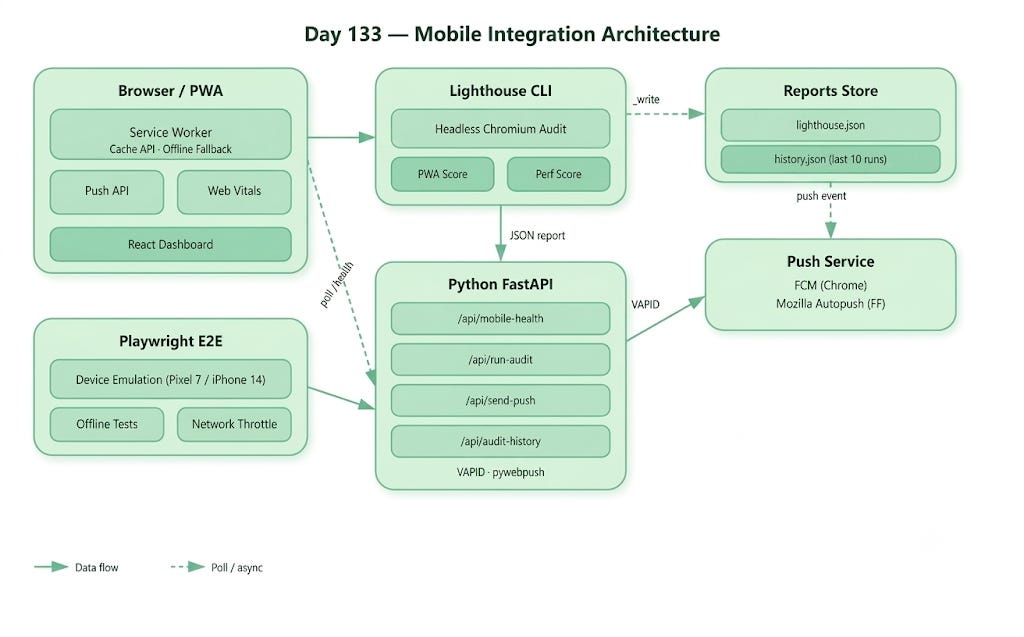
Your test infrastructure wraps around the running application like a quality gate. The Python backend exposes a /api/mobile-health endpoint that aggregates five signal types: PWA score, cache status, push delivery, Core Web Vitals, and E2E pass rate. The React dashboard polls this endpoint and renders live status tiles — exactly the kind of internal QA dashboard you would find at teams running large-scale PWAs like Twitter Lite, Flipkart, or Uber Eats Web.
