

Day 130: Push Notifications
What We Are Building Today
By the end of this lesson, InfraWatch proactively alerts engineers about system events — even when the browser tab is closed:
Web Push subscription pipeline — VAPID-authenticated, browser-native delivery
Notification scheduler — APScheduler with per-user timezone and quiet-hour awareness
Notification management UI — category-level enable/disable controls per user role
Personalization engine — role-based defaults, quiet-hour filtering, and snooze support
Analytics dashboard — delivery rate, CTR, dismiss rate, and subscription health
Why Push Notifications Are an Architectural Decision, Not a Feature
Most developers treat push notifications as a UI checkbox. Engineering teams at PagerDuty and Datadog treat them as a critical reliability contract between the system and the on-call engineer. A notification arriving 4 minutes late during an incident cascade is functionally useless.
The Web Push Protocol (RFC 8030) makes browser notifications independent of your backend’s uptime. Your server doesn’t hold a persistent socket to the browser — it posts an encrypted payload to a vendor-operated push relay (Google’s FCM for Chrome, Mozilla’s autopush for Firefox). That relay maintains the connection and delivers the message when the browser next connects. This is why notifications survive tab closure and network drops.
Component Architecture
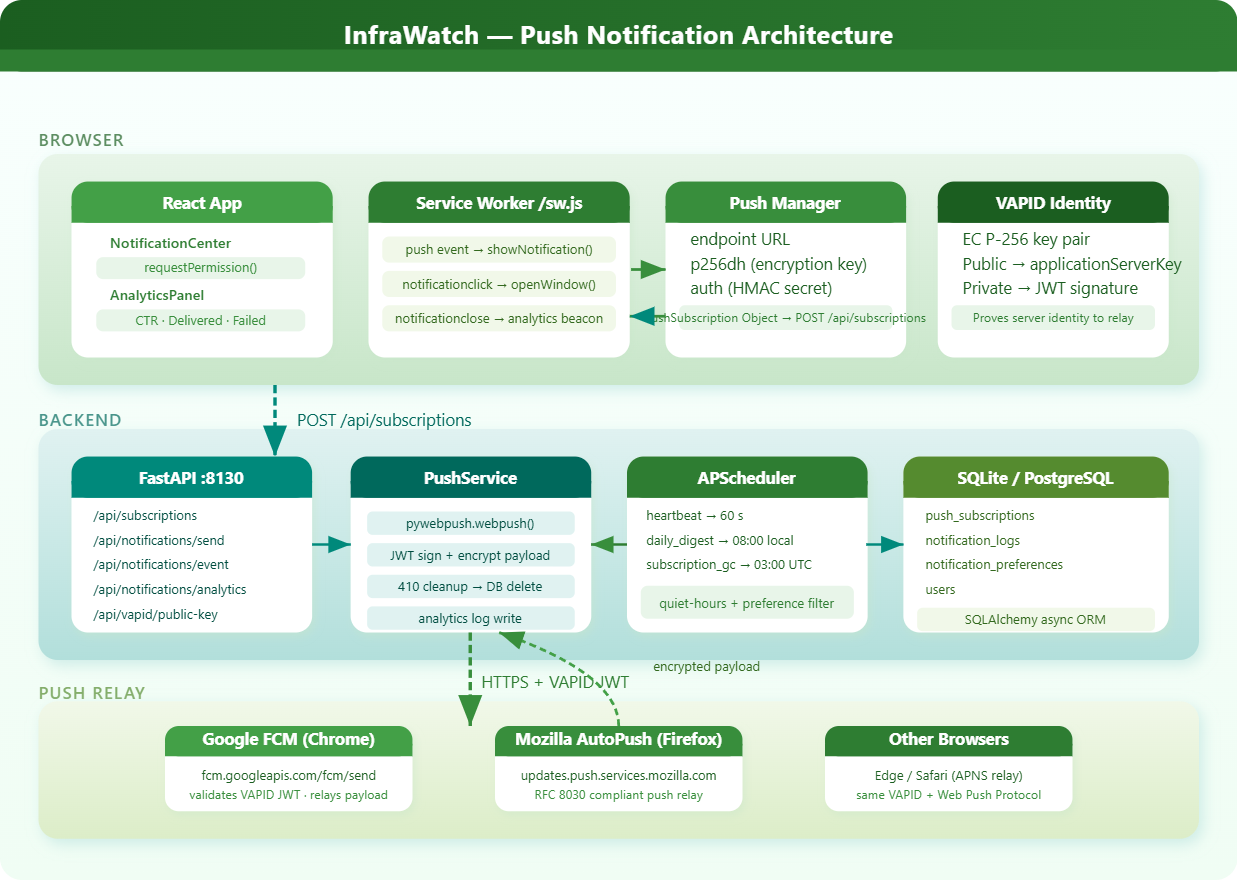
Core Concept: VAPID Authentication
VAPID (Voluntary Application Server Identification for Web Push) proves that a notification came from your server, not a spoofed source.
You generate an EC P-256 key pair once. The public key is embedded in your frontend subscription call; the private key signs a short-lived JWT on every push request. The push relay validates that JWT before forwarding the message.
VAPID Private Key  →  signs JWT  →  Authorization header  →  Push Relay validates  →  delivers
VAPID Public Key   →  embedded in PushSubscription  →  tied to your server identity
This is the same elliptic-curve cryptography used in TLS 1.3. The short-lived JWT (24-hour TTL max) means a leaked token has a bounded blast radius.
One rule that trips everyone up: never rotate VAPID keys without first unsubscribing all existing subscribers. Old subscriptions bind to the original public key — they start returning 403 the moment your keys change, silently breaking delivery for every user. Treat VAPID key rotation exactly like rotating a TLS certificate: plan it, notify, and migrate.
Subscription Lifecycle
When a user clicks “Enable Notifications” in InfraWatch, five things happen in sequence:
Browser calls
Notification.requestPermission()— this requires an explicit user gesture; you cannot trigger it programmatically without a clickService Worker calls
pushManager.subscribe({ userVisibleOnly: true, applicationServerKey })Browser contacts the vendor push service and receives a unique push endpoint URL plus two encryption keys:
p256dhandauthFrontend POSTs the
PushSubscriptionobject toPOST /api/subscriptionsBackend stores the endpoint and keys in PostgreSQL, tagged to the user ID and role
The subscription object is the user’s mailing address in push-space. It does not belong to your database — it belongs to the browser and the vendor relay. When the relay returns HTTP 410 Gone, that address has been invalidated. Delete it immediately. Stale subscriptions silently inflate your “sent” counter while actual delivery stays at zero.
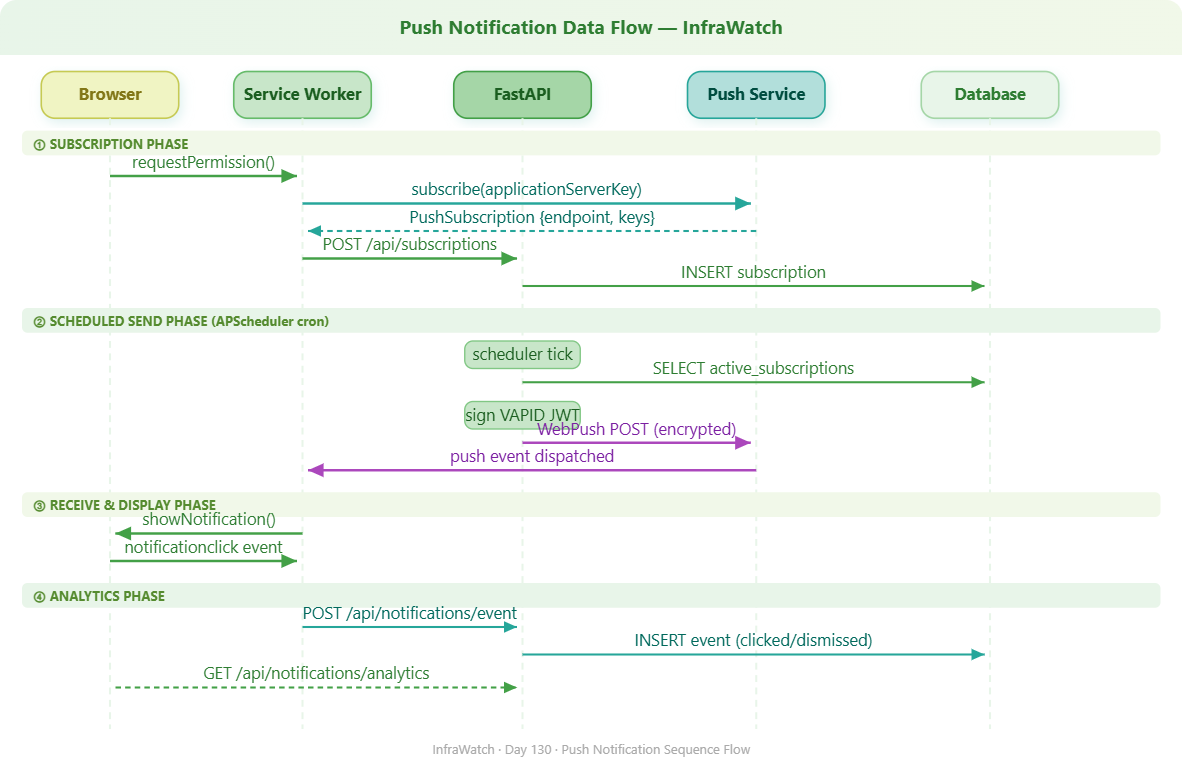
Notification Scheduling Architecture
InfraWatch uses APScheduler (AsyncIOScheduler) inside FastAPI. Three jobs run on independent schedules:
Job Trigger Purpose heartbeat_check every 60 s Alert digest for triggered monitors daily_summary cron 08:00 user-local Daily system health brief subscription_gc cron 03:00 UTC Remove 410-Gone stale subscriptions
Quiet hours are enforced at the scheduler level, not in JavaScript. If it is 02:00 in the user’s configured timezone, the job skips that user entirely. Client-side suppression is unreliable — the tab might not even be open.
The scheduler must use AsyncIOScheduler, not BackgroundScheduler. The latter runs in a separate thread and cannot await async SQLAlchemy session methods. Mixing them causes event loop conflicts that are difficult to reproduce and nearly impossible to debug under load.
The Service Worker’s Role
The Service Worker is a background JavaScript thread that persists independently of your React app. It registers a push event listener that fires whenever the relay delivers a message.
self.addEventListener('push', event => {
    const data = event.data.json()
    event.waitUntil(
        self.registration.showNotification(data.title, {
            body: data.body,
            icon: data.icon,
            data: { url: data.url, notificationId: data.id }
        })
    )
})
event.waitUntil() is not optional — without it, the browser terminates the Service Worker before showNotification completes and the notification never appears. The notificationclick handler uses clients.openWindow() to navigate the user to the relevant dashboard panel, using the URL embedded in the notification payload.
The Service Worker file must live at public/sw.js so Vite serves it at the root scope /sw.js. A worker registered at /src/sw.js controls only the /src/ scope and will miss every push event.
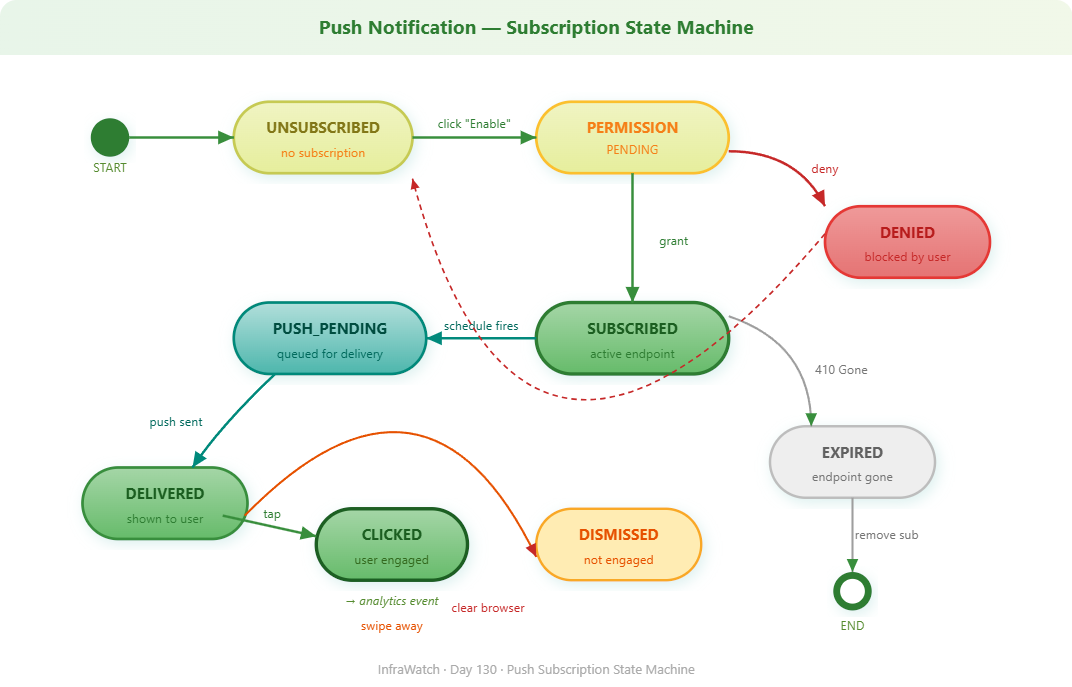
Personalization: More Than “Turn On/Off”
InfraWatch segments preferences by category: Alerts, Team Updates, Daily Digest, Security Events. Each has independent enable/disable and threshold settings in the notification_preferences table.
Role-based defaults matter: a DevOps engineer defaults to all alert categories on; a product manager defaults to daily digest only. This mirrors PagerDuty’s urgency-tier routing — segmented per on-call rotation, not binary on/off.
Overnight quiet-hour windows (e.g., 22:00–07:00) require a specific branch in the scheduler. The naive check 22 <= hour < 7 is always False because 22 is never less than 7. You need:
if start > end:   # overnight window — e.g., 22:00 to 07:00
    if hour >= start or hour < end:
        continue  # inside quiet window, skip this user
else:
    if start <= hour < end:
        continue
Analytics: What Actually Matters
Four metrics define push system health:
Delivery rate = delivered / sent (target > 95%; lower values indicate stale subscriptions)
Click-through rate = clicked / delivered (benchmark: 10–20% for actionable infrastructure alerts)
Dismiss rate = dismissed / delivered (rising dismiss rate signals low signal-to-noise)
Subscription churn = unsubscribed this week / active (above 5% means notification fatigue)
The Service Worker reports click and dismiss events to POST /api/notifications/event with the notificationId. The backend timestamps these and links them to the original notification record.
notification_events is a separate table, not columns on notifications. This lets you record multiple events per notification — delivered at T+0, clicked at T+45s — with full timestamps. This is the same pattern PagerDuty uses to calculate acknowledgement latency on incident alerts.
How This Fits InfraWatch
This module connects Week 11’s User & Team Management theme to the alerting system from earlier weeks. The notification subscription lives alongside user profile data. The scheduler reads from the same alert tables built in Weeks 5–7. Analytics feed the same dashboard infrastructure from Week 9.
Architecturally, Day 130 closes the loop: InfraWatch can now reach the engineer rather than waiting for the engineer to open a tab.
Implementation Guide
GitHub Link:-
https://github.com/sysdr/infrawatch/tree/main/day130/infrawatch-day130
Project Structure
Running ./setup.sh creates the full project at ./infrawatch-day130/ and writes every source file as heredoc. No file needs to be created manually.
infrawatch-day130/
├── backend/
│   ├── app/
│   │   ├── api/         notifications.py  subscriptions.py  users.py  vapid.py
│   │   ├── models/      models.py
│   │   ├── schemas/     schemas.py
│   │   └── services/    push_service.py   scheduler_service.py
│   ├── tests/           conftest.py   test_push_notifications.py
│   ├── generate_vapid.py
│   ├── main.py
│   └── requirements.txt
├── frontend/
│   ├── public/          sw.js   manifest.json   icons/
│   └── src/
│       ├── hooks/       usePushNotifications.js
│       ├── pages/       Dashboard.jsx
│       └── services/    api.js
└── docker-compose.yml
Step 1 — VAPID Key Generation
VAPID keys are EC P-256 asymmetric keypairs. Generate them once. In production, store the private key in a secrets manager (Vault, AWS Secrets Manager). The setup script calls generate_vapid.py automatically on first run — but you can run it independently:
cd infrawatch-day130/backend
python generate_vapid.py
# Writes VAPID_PUBLIC_KEY and VAPID_PRIVATE_KEY to .env
The generator uses Python’s cryptography library. The private key is PEM-encoded (required by pywebpush); the public key is URL-safe base64 (required by the browser’s subscribe() call). Never commit the private key to source control.
Verify the key was written:
curl http://localhost:8130/api/vapid/public-key
{ "public_key": "BOM4eVR2T1gNlBMv8UXa2n..." }
If this returns an empty string, the .env file was not populated. Re-run generate_vapid.py.
Step 2 — Database Schema
Four tables, each with a distinct responsibility:
Table Key Fields Purpose push_subscriptions endpoint, p256dh, auth, user_id, is_active One row per browser session per user notification_preferences category flags, quiet_hours_start/end, snoozed_until Per-user delivery rules notifications title, body, category, status, sent_at Every sent notification record notification_events notification_id, event_type, occurred_at Click / dismiss / delivered timestamps
The endpoint column on push_subscriptions carries a unique constraint. Subscription creation always uses an upsert on endpoint — the browser will call subscribe() again after a service worker re-registration, and a blind insert would throw a unique constraint violation every time.
Step 3 — Subscription API
# Pseudo-code: POST /api/subscriptions
existing = query(PushSubscription).filter_by(endpoint=endpoint).first()
if existing:
    existing.is_active = True
    existing.p256dh    = keys.p256dh
    existing.auth      = keys.auth
else:
    db.add(PushSubscription(user_id=user_id, endpoint=endpoint, ...))
# Then upsert role-based default preferences for this user
Create a user and register a subscription:
# Create a user
UID=$(curl -s -X POST http://localhost:8130/api/users \
  -H 'Content-Type: application/json' \
  -d '{"username":"alice","email":"alice@infrawatch.dev","role":"devops","timezone":"UTC"}' \
  | python3 -c "import sys,json; print(json.load(sys.stdin)['id'])")
echo "User: $UID"

# Register a subscription for that user
curl -X POST http://localhost:8130/api/subscriptions \
  -H 'Content-Type: application/json' \
  -d "{
    \"user_id\":  \"$UID\",
    \"endpoint\": \"https://fcm.googleapis.com/fcm/send/...\",
    \"keys\": { \"p256dh\": \"BNcR...\", \"auth\": \"tBHI...\" }
  }"
{ "id": "775dbc46...", "user_id": "...", "is_active": true }
Step 4 — Sending with pywebpush
from pywebpush import webpush, WebPushException

webpush(
    subscription_info={
        "endpoint": sub.endpoint,
        "keys": { "p256dh": sub.p256dh, "auth": sub.auth }
    },
    data=json.dumps({ "title": title, "body": body, "url": url, "id": notif_id }),
    vapid_private_key=settings.VAPID_PRIVATE_KEY,
    vapid_claims={
        "sub": settings.VAPID_CLAIMS_EMAIL,
        "aud": extract_audience(sub.endpoint),
    },
)
Three response codes to handle explicitly:
HTTP Status Meaning Action Required 201 Created Accepted by relay Log as delivered 410 Gone Subscription invalidated Delete from DB immediately 429 Too Many Requests Rate limited Log warning, retry with exponential backoff
Send a notification:
NID=$(curl -s -X POST http://localhost:8130/api/notifications/send \
  -H 'Content-Type: application/json' \
  -d "{
    \"user_id\":  \"$UID\",
    \"category\": \"alerts\",
    \"title\":    \"CPU Spike\",
    \"body\":     \"prod-web-01 CPU at 94%\",
    \"url\":      \"/dashboard/alerts\"
  }" | python3 -c "import sys,json; print(json.load(sys.stdin)['notification_id'])")
echo "Notification ID: $NID"
In development without a live browser subscription, the push delivery will report no_subscription_or_vapid_not_configured. The notification record and analytics write correctly regardless — only the actual relay dispatch requires a live browser.
Step 5 — APScheduler Setup
from apscheduler.schedulers.asyncio import AsyncIOScheduler
from apscheduler.triggers.interval  import IntervalTrigger
from apscheduler.triggers.cron      import CronTrigger

scheduler = AsyncIOScheduler()
scheduler.add_job(heartbeat_check, IntervalTrigger(seconds=60),     id="heartbeat")
scheduler.add_job(daily_summary,   CronTrigger(hour=8, minute=0),   id="daily_summary")
scheduler.add_job(subscription_gc, CronTrigger(hour=3, minute=0),   id="subscription_gc")

@asynccontextmanager
async def lifespan(app):
    await init_db()
    scheduler.start()
    yield
    scheduler.shutdown()
Each scheduler job must create its own AsyncSession via async_sessionmaker. Never pass the request-scoped session to a background job — it will be closed by the time the job runs, throwing DetachedInstanceError in production under concurrent load.
Step 6 — Service Worker Push Handler
// frontend/public/sw.js

self.addEventListener('push', event => {
    const data = event.data.json();
    event.waitUntil(
        self.registration.showNotification(data.title, {
            body:    data.body,
            icon:    '/icons/icon-192x192.png',
            data:    { url: data.url, notificationId: data.id },
            actions: [
                { action: 'view',    title: 'View'    },
                { action: 'dismiss', title: 'Dismiss' }
            ]
        }).then(() => reportEvent(data.id, 'delivered'))
    );
});

self.addEventListener('notificationclick', event => {
    event.notification.close();
    event.waitUntil(clients.openWindow(event.notification.data.url));
    reportEvent(event.notification.data.notificationId, 'clicked');
});
reportEvent is a plain fetch() to POST /api/notifications/event. It fires inside event.waitUntil() so the browser keeps the service worker alive long enough for the network request to complete.
Step 7 — Frontend Subscription Hook
// Pseudo-code: usePushNotifications.js

const vapidKey   = await api.vapid.getPublicKey();
const permission = await Notification.requestPermission();
if (permission !== 'granted') return;

const sw  = await navigator.serviceWorker.ready;
const sub = await sw.pushManager.subscribe({
    userVisibleOnly:      true,
    applicationServerKey: urlBase64ToUint8Array(vapidKey)  // must be Uint8Array, not a string
});

await api.subscriptions.create({ user_id: userId, ...sub.toJSON() });
urlBase64ToUint8Array converts the URL-safe base64 VAPID public key into raw bytes. Passing the base64 string directly throws DOMException: Failed to execute 'subscribe' on 'PushManager'.
Step 8 — Preferences and Quiet Hours
# View preferences (auto-created on first subscription with role-based defaults)
curl http://localhost:8130/api/notifications/preferences/$UID

# Enable quiet hours 22:00 to 07:00
curl -X PATCH http://localhost:8130/api/notifications/preferences/$UID \
  -H 'Content-Type: application/json' \
  -d '{"quiet_hours_enabled": true, "quiet_hours_start": 22, "quiet_hours_end": 7}'

# Snooze all notifications for 60 minutes
curl -X POST http://localhost:8130/api/notifications/snooze \
  -H 'Content-Type: application/json' \
  -d "{\"user_id\": \"$UID\", \"duration_minutes\": 60}"

# Clear snooze early
curl -X DELETE http://localhost:8130/api/notifications/snooze/$UID
Step 9 — Record Events and Query Analytics
# Record a click event
curl -X POST http://localhost:8130/api/notifications/event \
  -H 'Content-Type: application/json' \
  -d "{\"notification_id\": \"$NID\", \"event_type\": \"clicked\"}"

# Pull the full analytics summary
curl http://localhost:8130/api/notifications/analytics | python3 -m json.tool
{
  "totals":    { "sent": 4, "delivered": 4, "clicked": 2, "dismissed": 2, "failed": 0 },
  "rates":     { "delivery_rate": 100.0, "ctr": 50.0, "dismiss_rate": 50.0 },
  "subscriptions": { "active": 2, "inactive": 0 },
  "by_category": [
    { "category": "alerts",       "count": 2 },
    { "category": "daily_digest", "count": 2 }
  ]
}
Build, Test and Demo
Running the Project
Without Docker
chmod +x setup.sh
./setup.sh
The script creates the full project, generates VAPID keys, installs all dependencies, runs 10 tests, starts the backend on :8130 and the frontend on :3130, then runs a live functional demo against the API. Every source file is written from heredoc — nothing needs to be downloaded separately.
With Docker
USE_DOCKER=true ./setup.sh
Starts two containers: infrawatch-backend-130 (uvicorn) and infrawatch-frontend-130 (nginx). Same ports apply.
Expected terminal output from either path:
[OK]  backend/requirements.txt
[OK]  backend/.env
[OK]  backend/generate_vapid.py
[OK]  backend/main.py
[OK]  backend/app/config.py
[OK]  backend/app/database.py
[OK]  backend/app/models/models.py
[OK]  backend/app/schemas/schemas.py
[OK]  backend/app/services/push_service.py
[OK]  backend/app/services/scheduler_service.py
[OK]  backend/app/api/subscriptions.py
[OK]  backend/app/api/notifications.py
[OK]  backend/app/api/users.py
[OK]  backend/app/api/vapid.py
[OK]  backend/tests/conftest.py
[OK]  backend/tests/test_push_notifications.py
[OK]  frontend/package.json
[OK]  frontend/vite.config.js
[OK]  frontend/index.html
[OK]  frontend/public/sw.js
[OK]  frontend/public/manifest.json
[OK]  frontend/src/main.jsx
[OK]  frontend/src/App.jsx
[OK]  frontend/src/styles.css
[OK]  frontend/src/services/api.js
[OK]  frontend/src/hooks/usePushNotifications.js
[OK]  frontend/src/pages/Dashboard.jsx
[OK]  All tests passed
[OK]  Backend running on :8130
[OK]  Frontend running on :3130
Tests
cd infrawatch-day130/backend
.venv/bin/python -m pytest tests/ -v
tests/test_push_notifications.py::test_create_user                  PASSED
tests/test_push_notifications.py::test_list_users                   PASSED
tests/test_push_notifications.py::test_create_subscription          PASSED
tests/test_push_notifications.py::test_get_user_subscriptions       PASSED
tests/test_push_notifications.py::test_get_and_update_preferences   PASSED
tests/test_push_notifications.py::test_analytics_endpoint           PASSED
tests/test_push_notifications.py::test_record_notification_event    PASSED
tests/test_push_notifications.py::test_snooze_and_clear             PASSED
tests/test_push_notifications.py::test_vapid_public_key             PASSED
tests/test_push_notifications.py::test_health                       PASSED

======================== 10 passed in ~2.7s ========================
All 10 tests use httpx.AsyncClient with ASGITransport — no background server is needed and no real push calls are made. Tests cover the complete request-response cycle including DB writes, event recording, and analytics aggregation.
Functional Verification
Work through these steps in order after ./setup.sh completes.
Health check
curl http://localhost:8130/health
{ "status": "ok", "service": "infrawatch-push-notifications", "day": 130 }
VAPID public key
curl http://localhost:8130/api/vapid/public-key
{ "public_key": "BFbDKwKfbskLDD42..." }
Create a user and subscription, send a notification, record a click
UID=$(curl -s -X POST http://localhost:8130/api/users \
  -H 'Content-Type: application/json' \
  -d '{"username":"alice","email":"alice@infrawatch.dev","role":"devops","timezone":"UTC"}' \
  | python3 -c "import sys,json; print(json.load(sys.stdin)['id'])")

curl -s -X POST http://localhost:8130/api/subscriptions \
  -H 'Content-Type: application/json' \
  -d "{\"user_id\":\"$UID\",\"endpoint\":\"https://test.fcm.invalid/alice\",
       \"keys\":{\"p256dh\":\"BNcRd...\",\"auth\":\"tBHI...\"}}" > /dev/null

NID=$(curl -s -X POST http://localhost:8130/api/notifications/send \
  -H 'Content-Type: application/json' \
  -d "{\"user_id\":\"$UID\",\"category\":\"alerts\",
       \"title\":\"CPU Spike\",\"body\":\"prod-web-01 94%\",\"url\":\"/alerts\"}" \
  | python3 -c "import sys,json; print(json.load(sys.stdin)['notification_id'])")

curl -s -X POST http://localhost:8130/api/notifications/event \
  -H 'Content-Type: application/json' \
  -d "{\"notification_id\":\"$NID\",\"event_type\":\"clicked\"}"

curl http://localhost:8130/api/notifications/analytics | python3 -m json.tool
Confirm delivery_rate is 100.0 and ctr reflects your click event.
Swagger UI — open http://localhost:8130/docs to browse all 14 endpoints and fire test requests from the browser.
Dashboard Verification
Open
http://localhost:3130
. The dashboard has five tabs:
Tab What to confirm Overview Stat cards (Total Sent, Delivery Rate, CTR, Active Subscriptions), delivery funnel bar chart, category pie chart, recent notifications table Subscribe Browser push capability check, user selector, Subscribe / Unsubscribe button, live subscription status Preferences Four category toggles, quiet hours time pickers, snooze duration controls with active snooze display Send Test User selector, category dropdown, title/body/URL fields, four quick-fill templates Analytics CTR and delivery rate bar charts, category breakdown, metric interpretation guide
Testing real push delivery (Chrome or Firefox on localhost — no HTTPS needed):
Open
http://localhost:3130
and go to the Subscribe tab
Select a user and click Subscribe — the browser permission dialog appears
Click Allow — the subscription is saved to the backend and the status badge updates
Go to Send Test, select the same user, choose Alerts, fill in a message
Minimise the browser tab and click Send — the OS notification appears within 2 seconds
Stop All Services
./setup.sh stop

# Docker
USE_DOCKER=true ./setup.sh stop
Troubleshooting
Symptom Likely Cause Fix public_key is empty generate_vapid.py was not run cd backend && python generate_vapid.py Push service returns 403 Keys regenerated after subscriptions were saved Regenerate keys; users must re-subscribe Push service returns 410 Browser invalidated the endpoint subscription_gc handles this at 03:00 UTC; delete manually to test immediately Permission dialog does not appear Not triggered from a user gesture requestPermission() must be called inside a click handler sw.js returns 404 Service worker not at root scope File must be in frontend/public/, not frontend/src/ DetachedInstanceError in scheduler Job sharing the request-scoped session Create a fresh AsyncSession inside every scheduler job DOMException on subscribe() VAPID key passed as string, not bytes Run urlBase64ToUint8Array() before passing to applicationServerKey