

Day 128: Mobile Optimization — Building a Touch-First Infrastructure Dashboard
→ Subscribe now to Access All paid lessons & private source code repository - 250 + coding lessons.
Are you preparing for Cracking FAANG interviews ? Here is full Preparation kit: 52 FAANG System Design Interview Questions
What We’re Building Today
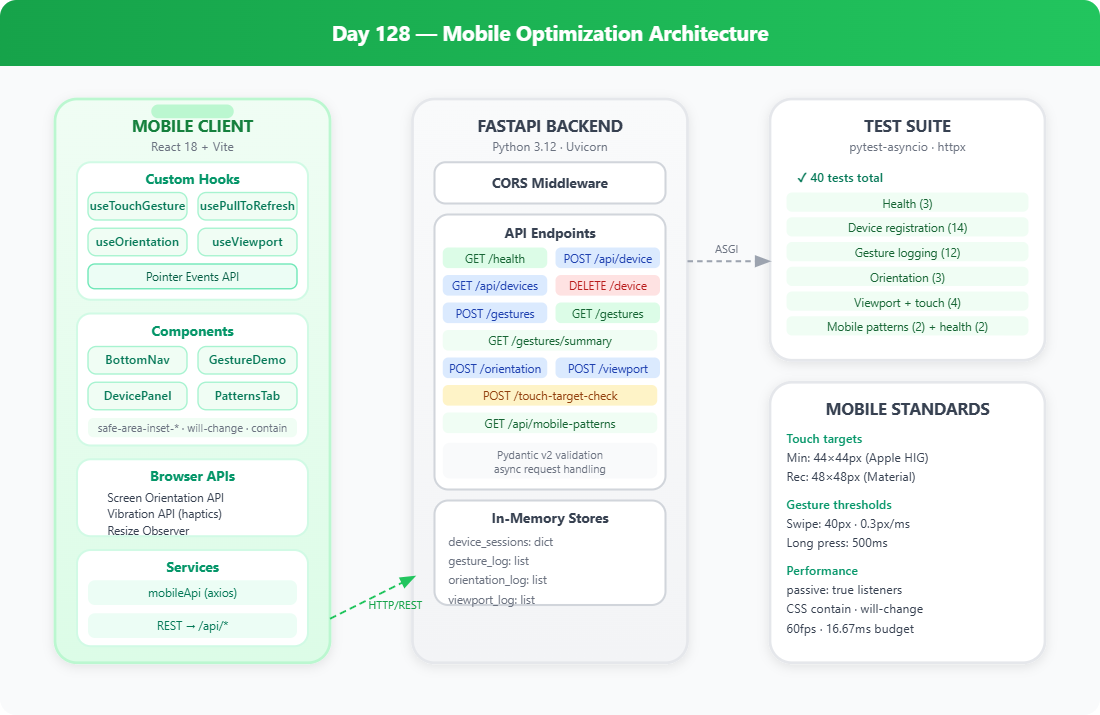
By the end of this lesson you will have a fully mobile-optimized InfraWatch dashboard that feels and behaves like a native app. Here’s the agenda:
A bottom navigation bar with badge counts — the pattern used by PagerDuty, Datadog mobile, and New Relic
Swipe-to-dismiss gesture on alert items — no buttons, just touch
Pull-to-refresh with a distance threshold and haptic feedback
Safe area insets so the UI doesn’t get swallowed by iPhone notches and Android chin bars
44px minimum touch targets throughout — the Apple HIG and Google Material Design minimum
Real system metrics from
psutilserved by FastAPI, updating every 30 seconds
This builds directly on Day 127 (PWA), taking the installable shell and making it genuinely usable with one thumb.
Why Mobile Optimization Is a Serious Engineering Problem
Every DevOps engineer has been there: a 3 a.m. page on your phone, you open the dashboard, and the table is a pixel-wide soup of compressed columns you can’t read, let alone tap. Grafana, Datadog, and PagerDuty all shipped dedicated mobile apps or heavily invested in mobile web precisely because an unoptimized monitoring dashboard under incident pressure is actively dangerous — you mis-read a number, you tap the wrong button.
Mobile optimization is not just “make it responsive.” It covers three separate problems:
Input model mismatch — Touch has no hover state, no right-click, 50ms tap delay (unless you remove it), and a 300ms ghost-click issue browsers introduced in 2014 that still bites developers who don’t set
touch-action: manipulation.Layout model —
100vhbreaks on iOS Safari when the address bar shows/hides. The correct unit is100dvh(dynamic viewport height), available since Safari 15.4.Interaction affordance — A user cannot swipe something they don’t know is swipeable. Design for discoverability: a slight peek of the red dismiss background before the user even swipes tells them what will happen.
→ Subscribe now to Access All paid lessons & private source code repository - 250 + coding lessons.
Are you preparing for Cracking FAANG interviews ? Here is full Preparation kit: 52 FAANG System Design Interview Questions
