Day 127: Progressive Web App
What We Are Building Today
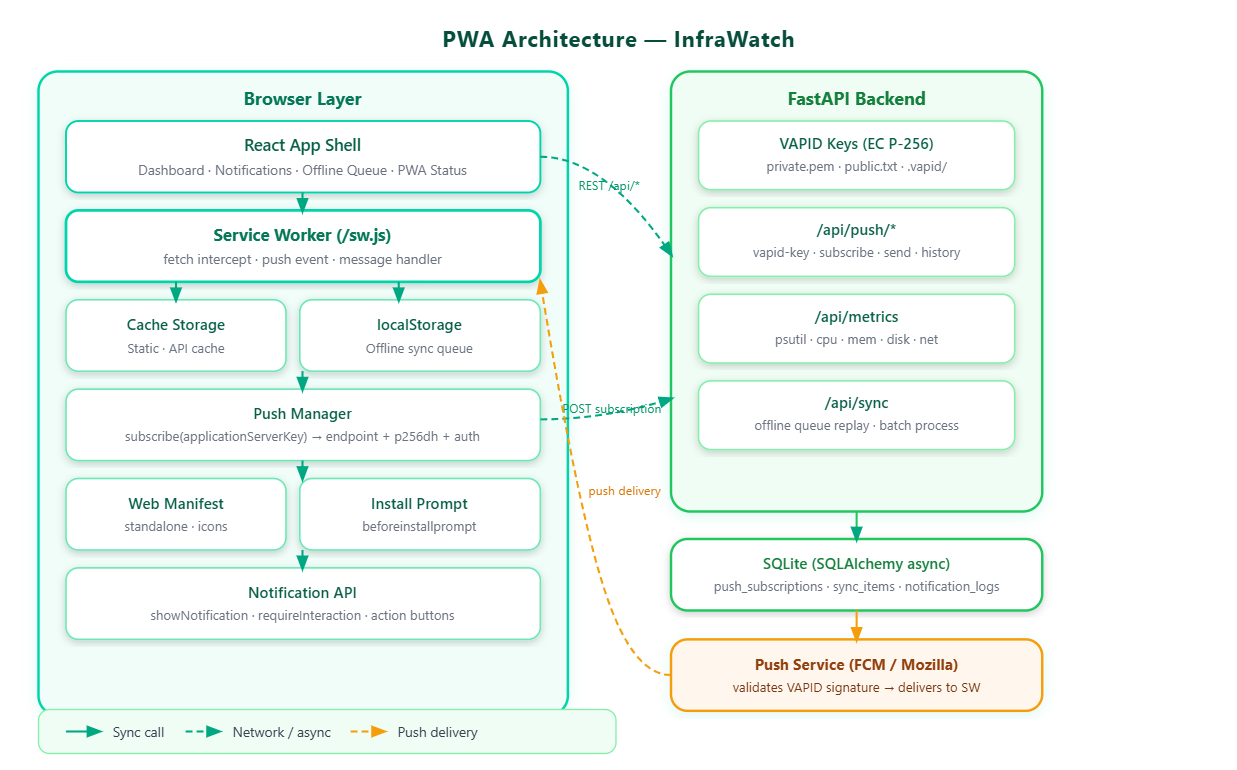
By the end of today, InfraWatch will install on a phone or desktop like a native app, work during a network outage using cached data, receive push alerts from our FastAPI backend, and silently queue failed API calls for retry when connectivity returns. Here is what we cover:
PWA manifest and installability via
vite-plugin-pwaA hand-written service worker with four caching strategies
VAPID key generation and push notification dispatch from FastAPI
Background sync queue for offline action replay
The App Shell architecture that makes InfraWatch open in under 200 ms
Part One: Concepts
The Three Pillars
A Progressive Web App is any web app that ships three things together: a Web App Manifest (JSON file declaring the app identity), a Service Worker (a background JavaScript thread with network interception power), and a secure context (HTTPS or localhost). That is the complete definition. The rest — push notifications, background sync, install prompts — layers on top.
Twitter Lite, Pinterest, and Starbucks were not built by rewriting their apps. They added these three things and unlocked 30–70% improvements in engagement metrics.
Service Worker: A Programmable Network Proxy
The most accurate mental model for a service worker is a programmable reverse proxy embedded inside the browser. Every fetch() call from your React app passes through it. Once active, the SW controls all network traffic from its scope, across all open tabs matching that scope.
The lifecycle has four states to internalize:
State What Happens Installing SW downloads; install event fires; you pre-cache the app shell Waiting Old SW still controls pages; new SW waits for all tabs to close Activating New SW takes over; activate fires; old caches are pruned Activated SW intercepts every fetch; caching logic runs here
The “waiting” state is where most PWA bugs appear. A new SW silently sits installed but inactive until all pages using the old SW close. Calling self.skipWaiting() in install bypasses this — useful in development, handled carefully in production.
Four Caching Strategies — Choosing a Policy
Every caching strategy is a tradeoff between freshness and availability. Pick based on how often your data changes.
Cache-First — For static assets (JS bundles, fonts, icons). Check cache first; if missing, fetch from network and cache it. The InfraWatch app shell uses this — the skeleton renders in under 100 ms even on a slow connection.
Network-First — For API data. Always attempt a live request. On failure, serve the cached response. InfraWatch uses this for metric data — you always see the most recent numbers available.
Stale-While-Revalidate — Serve cache immediately, update in background. Twitter’s timeline uses this — you see last-known content instantly while new data arrives silently.
Cache-Only — Serve from cache only, never touch the network. Used for the offline fallback page.