

Day 100: Script Management - Building an Enterprise-Grade Script Execution Engine
What We’re Building Today
Today we’re constructing a production-ready Script Management system that orchestrates automated operations across your infrastructure. This isn’t about running simple shell commands—we’re building an enterprise-grade execution engine with version control, parameterization, secure execution environments, and comprehensive output capture. You’ll create the foundation that powers automated remediation, scheduled maintenance, and operational playbooks used by platform engineering teams.
Key Components:
Versioned script repository with Git-like branching
Isolated execution environments with resource controls
Type-safe parameter validation and injection
Real-time output streaming with structured logging
Execution history with replay capabilities
Why Script Management Matters in Production Systems
When GitHub deploys infrastructure changes, Stripe runs payment reconciliation, or Netflix executes failoverprocedures, they rely on sophisticated script management systems. These aren’t ad-hoc automation tools—they’re critical infrastructure components ensuring operational consistency, auditability, and safety.
The challenge: How do you run potentially destructive operations across thousands of servers while maintaining version control, enforcing approval gates, and capturing detailed execution telemetry? The answer lies in treating scripts as first-class infrastructure components with their own lifecycle management.
System Architecture: Script as a Service
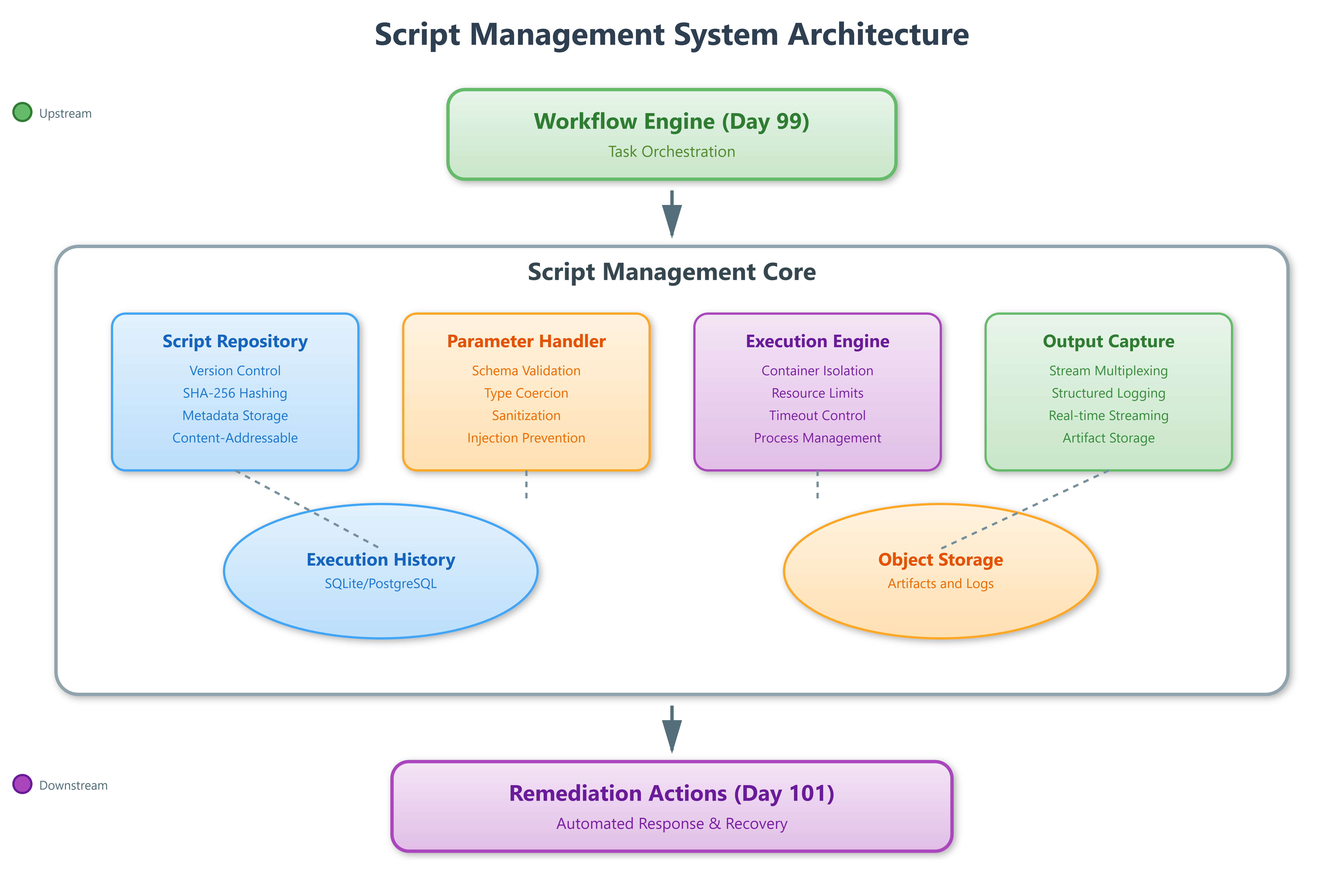
Our Script Management system sits between the Workflow Engine (Day 99) and Remediation Actions (Day 101), transforming declarative workflow steps into concrete execution units. Think of it as the “kernel” of your automation platform—it handles the low-level concerns of execution safety, resource isolation, and output capture while exposing a clean API for higher-level orchestration.
Core Architecture Principles
The Script Repository maintains versioned script definitions using content-addressable storage. Each script version gets a SHA-256 hash identifier, enabling immutable deployments and atomic rollbacks. Scripts are stored with metadata including runtime requirements, parameter schemas, and execution constraints.
The Execution Environment Manager provisions isolated containers per execution using Linux namespaces and cgroups. This prevents resource exhaustion attacks, contains failures, and ensures reproducible runs. Environment setup includes dependency injection, secret mounting, and network policy enforcement.
The Parameter Handler validates inputs against JSON Schema definitions, performs type coercion, and injects variables into the execution context. This prevents injection attacks and ensures scripts receive well-formed data structures.
The Output Capture System multiplexes stdout, stderr, and structured logs into separate streams. It provides real-time tailing capabilities while persisting complete execution artifacts for audit and debugging.
Control Flow: From Request to Execution
Request Phase: When a workflow triggers script execution, the system first resolves the script version from the repository. If version is “latest”, it pins to a specific SHA to ensure repeatability. The parameter handler validates inputs against the script’s schema, rejecting malformed requests before resource allocation.
Environment Provisioning: The executor creates an isolated container with restricted capabilities. It mounts read-only script artifacts, injects validated parameters as environment variables, and establishes resource limits (CPU, memory, execution timeout). Network policies restrict outbound connections to whitelisted endpoints.
Execution Phase: The script runs in a controlled subprocess with stdout/stderr redirected to the capture system. The executor maintains a heartbeat check, terminating runaway processes that exceed timeout thresholds. Structured logs flow through a separate channel for metrics extraction.
Completion Phase: Upon exit, the system captures return code, final output state, and resource utilization metrics. It stores artifacts in object storage with retention policies and updates execution history. Cleanup removes temporary containers and secrets.
Data Flow: Input Transformation to Output Artifacts
Parameters enter as JSON payloads, undergo schema validation, then get rendered into the execution context. Secrets are fetched from vault services and injected as temporary environment variables that auto-destruct post-execution.
During runtime, the output capture system parses stdout for structured log markers (JSON lines prefixed with @@), routing them to the metrics pipeline while preserving raw output for human readability. This dual-channel approach enables both real-time monitoring and detailed forensics.
Execution artifacts—including full output, timing data, and resource metrics—flow into time-series databases for trend analysis. This powers observability dashboards showing script failure rates, execution duration percentiles, and resource consumption patterns.
State Transitions: Execution Lifecycle Management
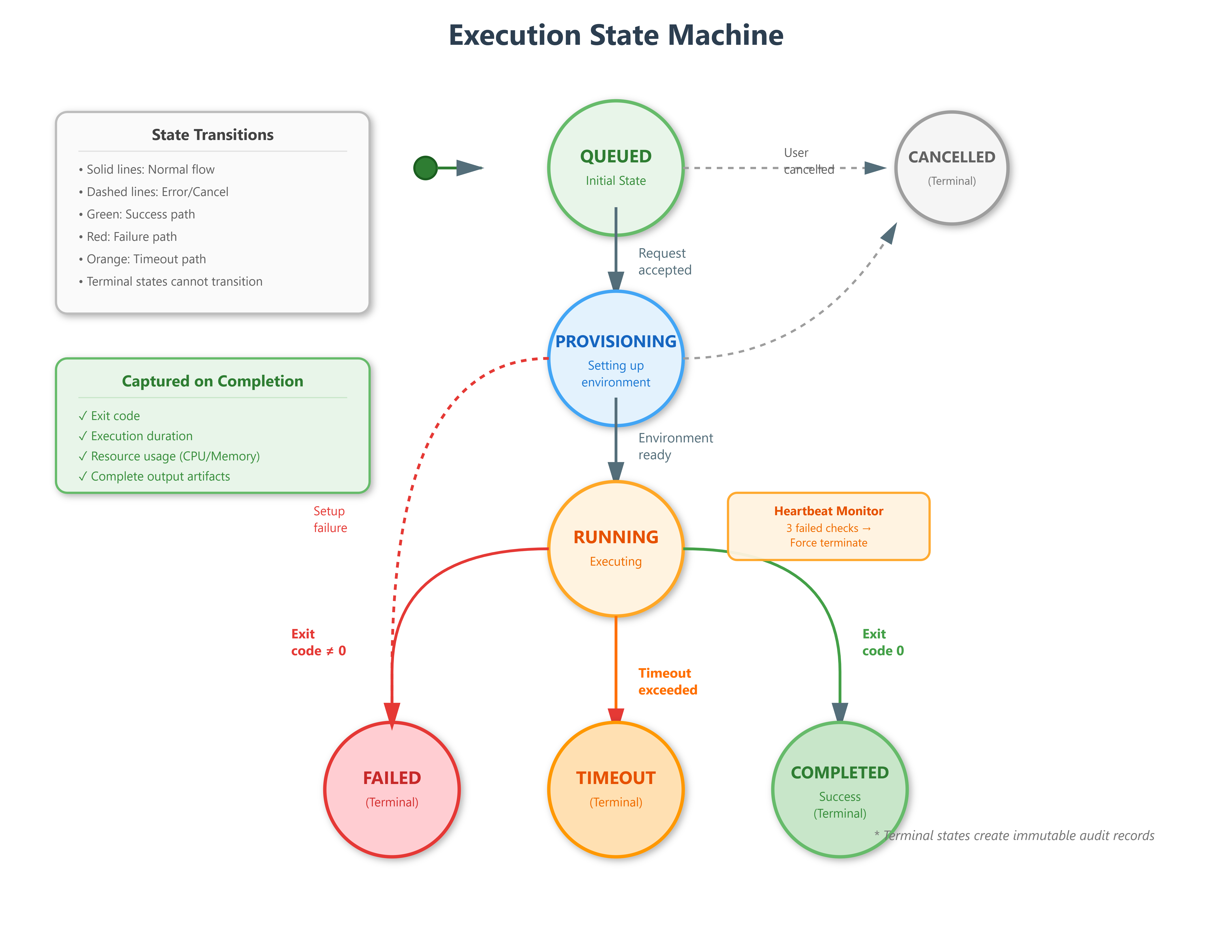
Scripts progress through states: QUEUED → PROVISIONING → RUNNING → COMPLETED/FAILED/TIMEOUT. Each transition triggers webhook notifications for integration with external systems.
The PROVISIONING state handles environment setup failures gracefully, cleaning up partial resources and transitioning to FAILED with diagnostic information. This prevents resource leaks from container orchestration errors.
RUNNING state includes internal substates for heartbeat tracking. If three consecutive heartbeats fail, the system transitions to TIMEOUT, forcefully terminates the container, and captures a partial output artifact for debugging.
Production Patterns: Real-World Considerations
Version Pinning: Always reference scripts by SHA, not symbolic names like “latest” or “v2”. This prevents race conditions where script content changes between approval and execution.
Idempotency Enforcement: Design scripts to check current state before applying changes. The execution framework provides helper utilities for state queries, enabling scripts to safely retry without side effects.
Output Structure: Use JSON Lines format for structured logs, enabling downstream systems to parse metrics without regex hacks. Reserve stdout for human-readable summaries.
Resource Limits: Set aggressive timeouts and memory caps. A hung script consuming resources is worse than a failed script—fail fast, fail clean.
Audit Trail: Every execution creates immutable records linking script version, parameters, invoker identity, and complete output. This satisfies compliance requirements and aids incident investigation.
Integration with Workflow Engine
Yesterday’s Workflow Engine invokes scripts as task steps, passing context variables as parameters. The Script Management system returns execution IDs immediately (async), with status callbacks triggering workflow state transitions.
For conditional branching, scripts emit structured events that the workflow interprets. Example: A health check script outputs {"status": "degraded", "action": "drain"}, causing the workflow to route to a drainage procedure instead of proceeding with deployment.
Tomorrow’s Remediation Actions will leverage this infrastructure, using pre-approved script templates that operators can trigger with one click during incidents.
Hands-On Implementation Guide
GitHub Link:-
https://github.com/sysdr/infrawatch/tree/main/day100/projectLet’s build this system step by step. We’ll create a complete working implementation with both backend and frontend components.
Step 1: Project Setup and Structure
First, create the project directory structure:
bash
mkdir -p script-management
cd script-management

mkdir -p backend/app/{models,services,api}
mkdir -p frontend/src/{components,services}
mkdir -p frontend/public
mkdir -p script_repository execution_workspace
Step 2: Backend Foundation - Database Models
Create the core data models that represent scripts and executions. The Script model uses SHA-256 hashing for content-addressable storage:
python
# backend/app/models/script.py
from sqlalchemy import Column, String, Integer, Text, DateTime, JSON
from datetime import datetime
import hashlib

class Script(Base):
    __tablename__ = "scripts"

    id = Column(Integer, primary_key=True, index=True)
    name = Column(String, index=True, nullable=False)
    version = Column(String, index=True, nullable=False)
    sha256 = Column(String, unique=True, index=True, nullable=False)
    content = Column(Text, nullable=False)
    description = Column(Text)
    parameter_schema = Column(JSON)
    runtime = Column(String, default="python")
    tags = Column(JSON)
    created_at = Column(DateTime, default=datetime.utcnow)
The Execution model tracks the complete lifecycle of each script run:
python
# backend/app/models/execution.py
class ExecutionState(str, Enum):
    QUEUED = "QUEUED"
    PROVISIONING = "PROVISIONING"
    RUNNING = "RUNNING"
    COMPLETED = "COMPLETED"
    FAILED = "FAILED"
    TIMEOUT = "TIMEOUT"

class Execution(Base):
    __tablename__ = "executions"

    execution_id = Column(String, unique=True, index=True, nullable=False)
    script_sha256 = Column(String, ForeignKey("scripts.sha256"))
    state = Column(String, default=ExecutionState.QUEUED.value)
    parameters = Column(JSON)
    stdout = Column(Text)
    stderr = Column(Text)
    exit_code = Column(Integer)
    duration_seconds = Column(Float)
    cpu_percent = Column(Float)
    memory_mb = Column(Float)
Step 3: Script Repository Service
The repository manages versioned script storage with content-addressable lookups:
python
# backend/app/services/repository.py
async def create_script(name, content, version, parameter_schema):
    sha256 = Script.compute_sha256(content)

    # Check if SHA already exists (deduplication)
    existing = await db.execute(
        select(Script).where(Script.sha256 == sha256)
    )
    if existing:
        return existing

    # Store script with metadata
    script = Script(
        name=name,
        version=version,
        sha256=sha256,
        content=content,
        parameter_schema=parameter_schema
    )
Step 4: Parameter Validation Handler
This component enforces type safety and prevents injection attacks:
python
# backend/app/services/parameter_handler.py
def validate_parameters(parameters, schema):
    # Validate against JSON Schema
    validate(instance=parameters, schema=schema)

    # Sanitize to prevent injection
    sanitized = {}
    for key, value in parameters.items():
        if isinstance(value, str):
            sanitized[key] = value.replace(";", "").replace("&&", "")
        else:
            sanitized[key] = value

    return sanitized

def prepare_environment(parameters):
    env_vars = {}
    for key, value in parameters.items():
        env_key = f"PARAM_{key.upper()}"
        env_vars[env_key] = str(value)
    return env_vars
Step 5: Execution Engine with Isolation
The executor provisions isolated environments and manages script lifecycle:
python
# backend/app/services/executor.py
async def execute(script, parameters):
    # Create isolated workspace
    workspace = Path(f"execution_workspace/{execution_id}")
    workspace.mkdir(parents=True, exist_ok=True)

    # Write script to workspace
    script_file = workspace / f"script.{get_extension(runtime)}"
    script_file.write_text(script.content)

    # Prepare environment with validated parameters
    env = os.environ.copy()
    env.update(prepare_environment(parameters))

    # Start process with resource limits
    process = await asyncio.create_subprocess_exec(
        "python3", str(script_file),
        stdout=asyncio.subprocess.PIPE,
        stderr=asyncio.subprocess.PIPE,
        env=env
    )

    # Wait with timeout
    exit_code = await asyncio.wait_for(
        process.wait(),
        timeout=MAX_EXECUTION_TIMEOUT
    )
Step 6: Output Capture System
The capture system multiplexes streams and extracts structured logs:
python
# backend/app/services/output_capture.py
async def capture_stream(stream, stream_type):
    while True:
        line = await stream.readline()
        if not line:
            break

        decoded = line.decode('utf-8').rstrip()

        # Check for structured log marker (@@)
        if decoded.startswith('@@'):
            log_data = json.loads(decoded[2:])
            structured_logs.append(log_data)

        # Store in buffer
        if stream_type == 'stdout':
            stdout_buffer.append(decoded)
        else:
            stderr_buffer.append(decoded)
Step 7: REST API Layer
Create endpoints for script management and execution:
python
# backend/app/api/routes.py
@router.post("/scripts")
async def create_script(script_data: ScriptCreate):
    repository = ScriptRepository(db)
    script = await repository.create_script(
        name=script_data.name,
        content=script_data.content,
        version=script_data.version,
        parameter_schema=script_data.parameter_schema
    )
    return script.to_dict()

@router.post("/executions")
async def execute_script(request: ScriptExecuteRequest):
    script = await repository.get_script_by_sha(request.script_sha256)
    executor = ScriptExecutor(db)
    execution_id = await executor.execute_script(
        script.sha256,
        request.parameters
    )
    return {"execution_id": execution_id}

@router.get("/executions/{execution_id}")
async def get_execution_status(execution_id: str):
    executor = ScriptExecutor(db)
    return await executor.get_execution_status(execution_id)
Step 8: Frontend - Script Repository Component
Build the UI for browsing and creating scripts:
javascript
// frontend/src/components/ScriptRepository.jsx
const ScriptRepository = ({ onScriptSelect }) => {
  const [scripts, setScripts] = useState([]);

  const loadScripts = async () => {
    const response = await scriptAPI.listScripts();
    setScripts(response.data);
  };

  return (
    <div className="bg-white rounded-lg shadow-md p-6">
      <h2 className="text-2xl font-bold flex items-center gap-2">
        <FileCode className="w-6 h-6" />
        Script Repository
      </h2>

      {scripts.map(script => (
        <div onClick={() => onScriptSelect(script)}
             className="p-4 border rounded-lg cursor-pointer">
          <h3 className="font-semibold">{script.name}</h3>
          <p className="text-sm text-gray-600">{script.description}</p>
          <div className="flex gap-4 mt-2 text-xs">
            <span>v{script.version}</span>
            <span className="font-mono">{script.sha256.substring(0, 8)}</span>
          </div>
        </div>
      ))}
    </div>
  );
};
Step 9: Parameter Form Component
Create the interface for configuring script parameters:
javascript
// frontend/src/components/ParameterForm.jsx
const ParameterForm = ({ script, onExecute }) => {
  const [parameters, setParameters] = useState({});

  const handleExecute = async () => {
    await onExecute(script, parameters);
  };

  const paramSchema = script.parameter_schema?.properties || {};

  return (
    <div className="bg-white rounded-lg shadow-md p-6">
      <h3 className="text-xl font-bold mb-4">Parameters</h3>

      {Object.entries(paramSchema).map(([name, schema]) => (
        <div key={name} className="mb-4">
          <label className="block text-sm font-medium mb-1">
            {name}
            {schema.description && (
              <span className="text-gray-500 text-xs ml-2">
                ({schema.description})
              </span>
            )}
          </label>
          <input
            type="text"
            value={parameters[name] || ''}
            onChange={(e) => setParameters({
              ...parameters,
              [name]: e.target.value
            })}
            className="w-full px-3 py-2 border rounded-lg"
          />
        </div>
      ))}

      <button onClick={handleExecute}
              className="w-full py-3 bg-green-600 text-white rounded-lg">
        <Play className="w-5 h-5" />
        Execute Script
      </button>
    </div>
  );
};
Step 10: Output Viewer with Real-Time Updates
Display execution output with live streaming:
javascript
// frontend/src/components/OutputViewer.jsx
const OutputViewer = ({ executionId }) => {
  const [execution, setExecution] = useState(null);
  const [liveOutput, setLiveOutput] = useState([]);

  useEffect(() => {
    if (!executionId) return;

    // Poll for execution status
    const pollInterval = setInterval(async () => {
      const response = await fetch(
        `http://localhost:8000/api/v1/executions/${executionId}`
      );
      const data = await response.json();
      setExecution(data);

      if (data.stdout) {
        const lines = data.stdout.split('\n').filter(line => line.trim());
        setLiveOutput(lines);
      }
    }, 2000);

    return () => clearInterval(pollInterval);
  }, [executionId]);

  return (
    <div className="bg-white rounded-lg shadow-md p-6">
      <h3 className="text-xl font-bold mb-4">Output Viewer</h3>

      <div className="bg-gray-900 text-green-400 p-4 rounded-lg
                      font-mono text-sm h-96 overflow-y-auto">
        {liveOutput.map((line, idx) => (
          <div key={idx}>
            <span className="text-gray-500 mr-2">
              {String(idx + 1).padStart(3, '0')}
            </span>
            {line}
          </div>
        ))}
      </div>
    </div>
  );
};
Step 11: Execution History Tracker
Show all past executions with filtering:
javascript
// frontend/src/components/ExecutionHistory.jsx
const ExecutionHistory = ({ onExecutionSelect }) => {
  const [executions, setExecutions] = useState([]);
  const [filterState, setFilterState] = useState('');

  const loadExecutions = async () => {
    const params = filterState ? { state: filterState } : {};
    const response = await scriptAPI.listExecutions(params);
    setExecutions(response.data);
  };

  return (
    <div className="bg-white rounded-lg shadow-md p-6">
      <h3 className="text-xl font-bold mb-6">Execution History</h3>

      <select value={filterState}
              onChange={(e) => setFilterState(e.target.value)}>
        <option value="">All States</option>
        <option value="RUNNING">Running</option>
        <option value="COMPLETED">Completed</option>
        <option value="FAILED">Failed</option>
      </select>

      {executions.map(execution => (
        <div onClick={() => onExecutionSelect(execution.execution_id)}
             className="p-4 border rounded-lg cursor-pointer">
          <div className="font-semibold">{execution.script_name}</div>
          <span className={`px-2 py-1 rounded text-xs ${
            execution.state === 'COMPLETED' ? 'bg-green-100' : 'bg-red-100'
          }`}>
            {execution.state}
          </span>
        </div>
      ))}
    </div>
  );
};
Building and Running the System
Local Development (Without Docker)
Step 1: Backend Setup
bash
cd backend

# Create virtual environment
python3 -m venv venv
source venv/bin/activate  # On Windows: venv\Scripts\activate

# Install dependencies
pip install -r requirements.txt

# Initialize database
python3 -c "
import asyncio
from app.database import init_db
asyncio.run(init_db())
"

# Start backend server
uvicorn app.main:app --host 0.0.0.0 --port 8000
```

**Expected Output:**
```
INFO:     Started server process [12345]
INFO:     Waiting for application startup.
INFO:     Application startup complete.
INFO:     Uvicorn running on http://0.0.0.0:8000
Step 2: Frontend Setup
Open a new terminal:
bash
cd frontend

# Install dependencies
npm install

# Start development server
npm start
```

**Expected Output:**
```
Compiled successfully!

You can now view script-management-ui in the browser.

  Local:            http://localhost:3000
  On Your Network:  http://192.168.1.x:3000
Docker Deployment
Step 1: Build Containers
bash
# Build and start all services
docker-compose up -d --build
```

**Expected Output:**
```
Creating network "script-management_default"
Building backend...
Building frontend...
Creating script-management_backend_1  ... done
Creating script-management_frontend_1 ... done
Step 2: Verify Services
bash
# Check running containers
docker-compose ps
```

**Expected Output:**
```
NAME                           STATUS    PORTS
script-management_backend_1    Up        0.0.0.0:8000->8000/tcp
script-management_frontend_1   Up        0.0.0.0:3000->80/tcp
Functional Testing
Test 1: Create a Script
bash
curl -X POST http://localhost:8000/api/v1/scripts \
  -H "Content-Type: application/json" \
  -d '{
    "name": "hello-world",
    "version": "1.0.0",
    "description": "Simple hello world script",
    "runtime": "python",
    "content": "#!/usr/bin/env python3\nimport os\nimport json\n\ntarget = os.getenv(\"PARAM_TARGET\", \"World\")\nprint(f\"Hello, {target}!\")\nprint(f'\''@@{{\"level\": \"info\", \"message\": \"Script executed\"}}'\'\')\nprint(json.dumps({\"status\": \"success\", \"greeting\": f\"Hello, {target}!\"}))",
    "parameter_schema": {
      "type": "object",
      "properties": {
        "target": {
          "type": "string",
          "description": "Target to greet"
        }
      }
    },
    "tags": ["demo", "hello"]
  }'
Expected Response:
json
{
  "id": 1,
  "name": "hello-world",
  "version": "1.0.0",
  "sha256": "a7b3c9d2e1f4...",
  "runtime": "python",
  "created_at": "2025-02-06T10:30:00"
}
Test 2: List Scripts
bash
curl http://localhost:8000/api/v1/scriptsExpected Response:
json
[
  {
    "id": 1,
    "name": "hello-world",
    "version": "1.0.0",
    "sha256": "a7b3c9d2e1f4...",
    "description": "Simple hello world script",
    "tags": ["demo", "hello"]
  }
]
Test 3: Execute Script
bash
curl -X POST http://localhost:8000/api/v1/executions \
  -H "Content-Type: application/json" \
  -d '{
    "script_name": "hello-world",
    "script_version": "latest",
    "parameters": {
      "target": "Script Management System"
    }
  }'
Expected Response:
json
{
  "execution_id": "f9e8d7c6-b5a4-3c2b-1d0e-9f8e7d6c5b4a"
}
Test 4: Monitor Execution
bash
curl http://localhost:8000/api/v1/executions/f9e8d7c6-b5a4-3c2b-1d0e-9f8e7d6c5b4aExpected Response (while running):
json
{
  "execution_id": "f9e8d7c6-b5a4-3c2b-1d0e-9f8e7d6c5b4a",
  "script_name": "hello-world",
  "state": "RUNNING",
  "start_time": "2025-02-06T10:35:00"
}
Expected Response (completed):
json
{
  "execution_id": "f9e8d7c6-b5a4-3c2b-1d0e-9f8e7d6c5b4a",
  "script_name": "hello-world",
  "state": "COMPLETED",
  "exit_code": 0,
  "stdout": "Hello, Script Management System!\n@@{\"level\": \"info\", \"message\": \"Script executed\"}\n{\"status\": \"success\", \"greeting\": \"Hello, Script Management System!\"}",
  "duration_seconds": 0.45,
  "cpu_percent": 12.3,
  "memory_mb": 45.6
}
Test 5: View Execution History
bash
curl http://localhost:8000/api/v1/executionsExpected Response:
json
[
  {
    "id": 1,
    "execution_id": "f9e8d7c6-b5a4-3c2b-1d0e-9f8e7d6c5b4a",
    "script_name": "hello-world",
    "script_version": "1.0.0",
    "state": "COMPLETED",
    "exit_code": 0,
    "duration_seconds": 0.45,
    "created_at": "2025-02-06T10:35:00"
  }
]
UI Dashboard Demonstration
Accessing the Dashboard
Open your browser and navigate to:
http://localhost:3000
Dashboard Features
1. Script Repository Panel (Left)
View all available scripts
Filter by name or tags
Click “New Script” to create scripts
Select any script to view details
Version history displayed for each script
2. Parameter Configuration Panel (Middle)
Shows selected script details
Input fields generated from parameter schema
Type validation in real-time
Execute button triggers script run
3. Output Viewer Panel (Middle)
Terminal-style output display
Real-time streaming during execution
Syntax highlighting for structured logs
Auto-scroll option
Separate stderr display
4. Execution History Panel (Right)
List of all past executions
Filter by state (Running, Completed, Failed)
Color-coded status badges
Click any execution to view details
Auto-refresh every 5 seconds
Creating Your First Script via UI
Click “New Script” button
Fill in the form:
Name:
system-health-checkVersion:
1.0.0Runtime:
PythonDescription:
Check system health metrics
Paste script content (provided in sample_scripts/)
Click “Create Script”
Script appears in repository list
Executing a Script via UI
Click on a script in the repository
Parameter form loads on the right
Enter parameter values
Click “Execute Script”
Output viewer updates in real-time
Execution appears in history panel
Monitoring Execution
Watch the state transitions:
QUEUED → Script accepted, waiting for resources
PROVISIONING → Environment being set up
RUNNING → Script actively executing
COMPLETED → Finished successfully (green badge)
FAILED → Error occurred (red badge)
Verification Checklist
Run through these checks to ensure everything works:
Backend Health:
bash
curl http://localhost:8000/health
# Expected: {"status": "healthy"}
API Documentation: Navigate to: http://localhost:8000/docs
Interactive API explorer should load
All endpoints listed
Try executing requests directly
Database Initialization:
bash
# Check if tables exist
sqlite3 backend/script_management.db ".tables"
# Expected: scripts  executions
Script Repository:
bash
ls -la script_repository/
# Should show created scripts organized by name/version
Execution Workspace:
bash
ls -la execution_workspace/
# Should show workspace directories for each execution
Frontend Build:
bash
cd frontend
npm run build
# Should complete without errors
# Creates optimized production build
Success Criteria
Your implementation should demonstrate:
Script Creation & Versioning
Create multiple script versions
Same content produces same SHA
Different versions stored separately
Parameter Validation
Invalid parameters rejected
Type coercion works correctly
Sanitization prevents injection
Isolated Execution
Scripts run in separate processes
Resource limits enforced
Timeout mechanisms work
Output Capture
Complete stdout/stderr captured
Structured logs extracted
Real-time streaming functional
State Management
All state transitions occur correctly
Terminal states are immutable
Metrics captured accurately
Execution History
All executions recorded
Filtering works correctly
Audit trail complete
Troubleshooting Guide
Backend Won’t Start:
bash
# Check if port 8000 is already in use
lsof -i :8000

# Check backend logs
tail -f backend.log

# Verify database exists
ls -la backend/script_management.db
Frontend Won’t Load:
bash
# Check if port 3000 is available
lsof -i :3000

# Verify API connection
curl http://localhost:8000/health

# Check frontend logs
tail -f frontend.log
Script Execution Fails:
bash
# Check execution workspace permissions
ls -la execution_workspace/

# Verify script content
curl http://localhost:8000/api/v1/scripts/{name}/versions

# Check for timeout issues
# Increase MAX_EXECUTION_TIMEOUT in config.py
Output Not Displaying:
bash
# Verify WebSocket connection (browser console)
# Check CORS settings in backend
# Ensure real-time polling is active