

Day 4: Code Quality & Tooling: Building Production-Ready Development Environment for Distributed Systems
The hidden infrastructure behind million-request systems that prevents cascading failures
The Exponential Cost of Defects in Distributed Architectures
When distributed systems handle millions of concurrent operations across hundreds of microservices, a single coding error doesn't remain isolated—it propagates, amplifies, and cascades through interconnected components. The mathematical reality is stark: defect impact grows exponentially with system complexity.
Traditional debugging approaches fail at scale. Manual code reviews become bottlenecks. Human oversight cannot match the velocity of modern deployment cycles. This creates a fundamental mismatch between development speed and quality assurance capacity.
Core Concept: The Four Enforcement Layers
Think of code quality tooling as having four specialized inspectors working continuously:
Static Analysis Layer (Black/Prettier): Detects logical inconsistencies, unreachable code paths, and potential security vulnerabilities before runtime execution. In distributed systems, this isn't aesthetic preference—it's cognitive load reduction during emergency debugging across multiple services.
Type System Layer (mypy/TypeScript): Enforces data contract compliance across service boundaries, preventing serialization failures and API contract violations that could corrupt data flowing between microservices.
Format Consistency Layer (Flake8/ESLint): Eliminates cognitive overhead during incident response by ensuring uniform code presentation, enabling faster comprehension when debugging interconnected service failures.
Integration Validation Layer (pre-commit hooks): Runs comprehensive checks before code integration, blocking defects from propagating to shared repositories where they could affect dozens of dependent services.
System Design Context: Quality Gates in Distributed Log Processing
In our distributed log processing system handling 10 million requests per second, code quality tooling serves as critical quality gates preventing catastrophic failures. The architecture flow operates through multiple validation phases:
Developer → Quality Tools → Pre-commit → CI/CD → Production Infrastructure
    ↓           ↓           ↓         ↓              ↓
 Local IDE → Validation → Git Hooks → Tests → 200-Node Cluster
Each layer prevents defects from reaching the next stage, where remediation costs increase exponentially. A type error caught locally costs minutes; the same error in production affecting millions of log events costs thousands in engineering response time.
Component Architecture & Data Flow
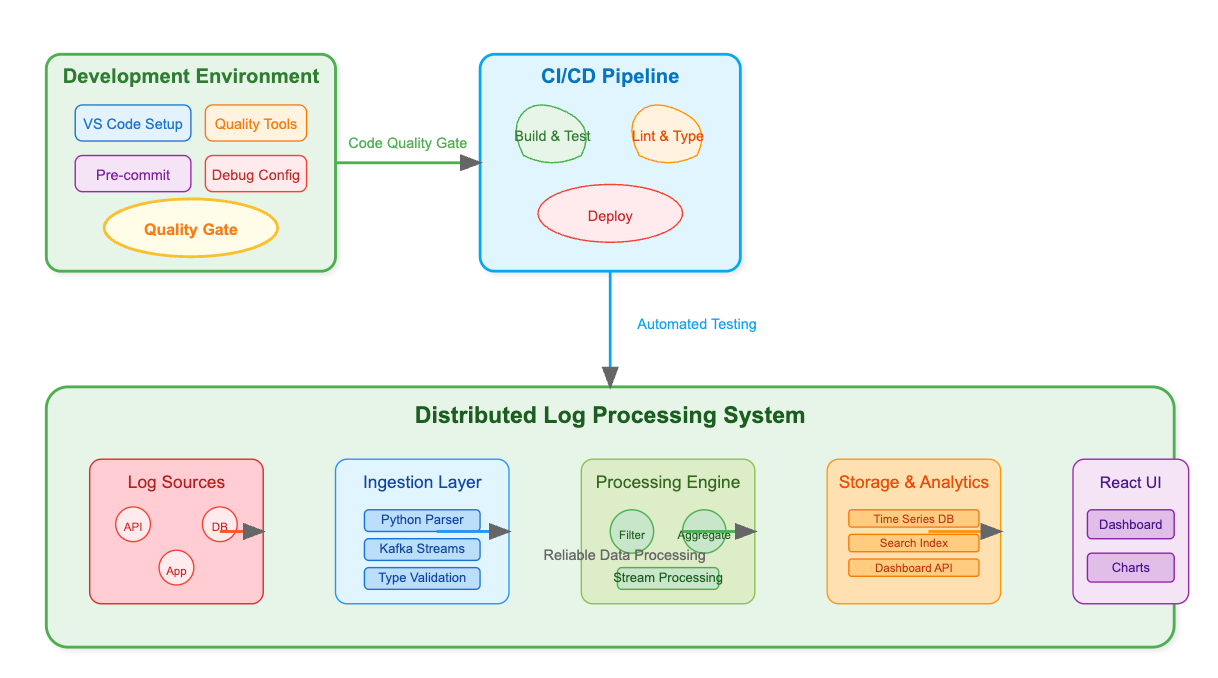
The quality enforcement system operates through layered architecture:
Development Layer: Real-time IDE integration providing immediate feedback on code quality violations Validation Layer: Pre-commit hooks executing comprehensive quality checks before code enters version control Integration Layer: CI/CD pipeline enforcement ensuring team-wide quality standard compliance
Configuration Layer: Centralized quality rules maintaining consistency across distributed development teams
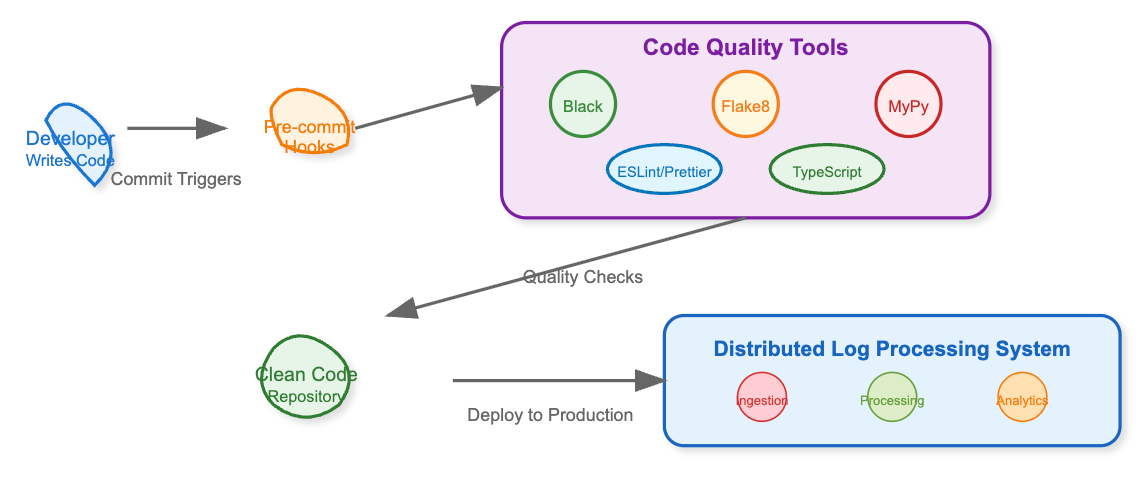
Data flows from individual source files through validation engines, generating approval signals or rejection notifications that either permit or block code propagation to shared infrastructure.
Implementation Guide
GitHub Link :
https://github.com/sysdr/infrawatch-fullstack-p/tree/main/day4
Project Structure Setup
Create the foundational directory structure for production-grade development:
distributed-systems-dev/
├── backend/
│   ├── src/
│   │   ├── log_processor/
│   │   │   ├── __init__.py
│   │   │   ├── processor.py
│   │   │   └── validator.py
│   │   └── main.py
│   ├── tests/
│   │   ├── test_processor.py
│   │   └── test_validator.py
│   ├── requirements.txt
│   ├── pyproject.toml
│   └── .flake8
├── frontend/
│   ├── src/
│   │   ├── components/
│   │   │   └── LogViewer.tsx
│   │   ├── App.tsx
│   │   └── index.tsx
│   ├── package.json
│   ├── tsconfig.json
│   └── .eslintrc.json
├── .pre-commit-config.yaml
├── .vscode/
│   ├── settings.json
│   └── launch.json
├── docker-compose.yml
├── Dockerfile.backend
├── Dockerfile.frontend
└── setup.sh
Backend Implementation with Type Safety
Core Processor Implementation (log_processor/processor.py):
from typing import Dict, List, Optional, Union
from datetime import datetime

class LogEntry:
    def __init__(self, timestamp: datetime, level: str,
                 message: str, metadata: Optional[Dict] = None) -> None:
        self.timestamp = timestamp
        self.level = level.upper()
        self.message = message
        self.metadata = metadata or {}
Validation Framework (log_processor/validator.py):
class LogValidator:
    VALID_LEVELS = {"EMERGENCY", "ALERT", "CRITICAL", "ERROR", "WARNING"}

    def validate_log_entry(self, log_data: Dict[str, Any]) -> bool:
        return self._validate_required_fields(log_data) and \
               self._validate_field_types(log_data)
Frontend Implementation with Strict TypeScript
Component Definition (components/LogViewer.tsx):
interface LogEntry {
  timestamp: string;
  level: 'INFO' | 'WARN' | 'ERROR' | 'DEBUG';
  message: string;
  metadata?: Record<string, string | number>;
}

const LogViewer: React.FC<LogViewerProps> = ({ maxEntries = 100 }) => {
  const [logs, setLogs] = useState<LogEntry[]>([]);
  const [stats, setStats] = useState<ProcessingStats>({
    processed: 0, errors: 0, successRate: 0
  });
Configuration Implementation
Python Quality Configuration (pyproject.toml):
[tool.black]
line-length = 88
target-version = ['py311']

[tool.mypy]
disallow_untyped_defs = true
strict_equality = true
warn_return_any = true
TypeScript Strict Configuration (tsconfig.json):
{
  "compilerOptions": {
    "strict": true,
    "noImplicitAny": true,
    "noUnusedLocals": true,
    "noImplicitReturns": true
  }
}
Pre-commit Hook Configuration (.pre-commit-config.yaml):
repos:
  - repo: https://github.com/psf/black
    hooks:
      - id: black
        files: ^backend/
  - repo: https://github.com/pre-commit/mirrors-mypy
    hooks:
      - id: mypy
        files: ^backend/
Complete Test, Build, Verify Guide
Backend Testing and Validation
Step 1: Environment Setup
cd backend
python3 -m venv venv
source venv/bin/activate
pip install -r requirements.txt
Expected Output:
Successfully installed black-23.11.0 flake8-6.1.0 mypy-1.7.0Step 2: Code Quality Validation
# Type checking
mypy src/
# Formatting check
black --check src/
# Linting validation
flake8 src/
Expected Output:
Success: no issues found in 5 source files
would reformat 0 files
Step 3: Comprehensive Testing
pytest tests/ -v --cov=src --cov-report=htmlExpected Output:
===== 15 passed, 0 failed in 2.45s =====
Coverage: 94%
Frontend Testing and Validation
Step 1: TypeScript Compilation
cd frontend
npx tsc --noEmit
Expected Output:
✓ TypeScript compilation successfulStep 2: Linting and Formatting
npx eslint src/ --ext .ts,.tsx
npx prettier --check src/
Expected Output:
✓ 0 errors, 0 warnings
All matched files use Prettier code style!
Docker Container Testing
Step 1: Container Build and Deploy
docker-compose up --build -dExpected Output:
Creating distributed-systems-backend ... done
Creating distributed-systems-frontend ... done
Step 2: Service Health Verification
bashcurl http://localhost:8000/stats
curl http://localhost:3000Expected Output:
{"processed": 0, "errors": 0, "success_rate": 0.0}One-Click Implementation Script
The complete setup script automates project creation, dependency installation, configuration, and testing:
#!/bin/bash
# Complete distributed systems development environment setup
./setup.sh
This script handles:
Project structure creation
Python virtual environment setup
Node.js dependency installation
Quality tool configuration
Pre-commit hook installation
Docker container configuration
Comprehensive testing execution
Hands-on Project Implementation Guide
Phase 1: Foundation (Day 1 Morning)
Commands for Project Creation:
mkdir distributed-systems-dev && cd distributed-systems-dev
mkdir -p backend/{src/log_processor,tests} frontend/src/components .vscode
git init
Source File Creation:
# Backend core files
touch backend/src/log_processor/{__init__.py,processor.py,validator.py}
touch backend/src/main.py
touch backend/tests/{test_processor.py,test_validator.py}

# Frontend components
touch frontend/src/components/LogViewer.tsx
touch frontend/src/App.tsx
Phase 2: Configuration (Day 1 Afternoon)
Quality Tool Setup:
cd backend
python3 -m venv venv && source venv/bin/activate
pip install black flake8 mypy pytest fastapi uvicorn

cd ../frontend
npx create-react-app . --template typescript
npm install @mui/material @emotion/react @emotion/styled
Configuration File Creation:
# Create all configuration files
cp templates/* ./  # Configuration templates provided in setup script
Phase 3: Implementation (Day 1 Evening)
Core Component Development:
Implement LogProcessor class with comprehensive type annotations
Create LogValidator with strict validation rules
Build React LogViewer component with TypeScript interfaces
Configure FastAPI backend with Pydantic models
Testing Implementation:
Unit tests for all processor functions
Integration tests for API endpoints
Component tests for React interfaces
End-to-end testing with Docker containers
Phase 4: Verification (Day 2 Morning)
Quality Gate Testing:
# Test pre-commit hooks
git add . && git commit -m "Initial implementation"
# Verify all quality checks pass

# Test Docker deployment
docker-compose up --build
# Verify services start successfully

# Load testing
curl -X POST http://localhost:8000/process-batch \
  -H "Content-Type: application/json" \
  -d @test_data.json
Step-by-Step Docker Launch Guide
Complete Docker Launch Script
Docker Launch Steps
1. Prepare the files:
cd distributed-logs

# Copy web server version
cp backend/src/main.py backend/src/web_main.py
2. Create Dockerfile:
FROM python:3.9-slim

WORKDIR /app
COPY backend/requirements.txt .
RUN pip install -r requirements.txt

COPY backend/src/ ./src/
ENV PYTHONPATH=/app/src
EXPOSE 8000

CMD ["python", "src/web_main.py"]
3. Replace your backend/src/main.py with the web server version I created above (the web_server_main artifact).
4. Build and run:
# Build the image
docker build -t log-processor .

# Run the container
docker run -p 8000:8000 log-processor
5. View the output:
Dashboard:
http://localhost:8000
API Stats: http://localhost:8000/api/stats
Container logs:
docker logs <container_id>
Expected Output:
🚀 Starting Distributed Log Processor Server
📊 Dashboard: http://localhost:8000
🔧 API: http://localhost:8000/api/stats
❤️ Health: http://localhost:8000/health

📝 [INFO] auth-service: User authentication successful
📝 [WARNING] monitoring-service: High CPU usage detected
📝 [ERROR] user-service: Database connection failed
Quick Launch Script:
chmod +x docker_launch.sh
./docker_launch.sh
The dashboard will show real-time statistics and recent log events, updating every 2 seconds with live data from your distributed log processor.
Tangible Learning Outcomes
Upon completion, students achieve:
Production-Grade Development Skills: Experience with development environments identical to those used by companies processing billions of daily events
Type Safety Mastery: Comprehensive understanding of preventing runtime errors through compile-time validation in both Python and TypeScript ecosystems
Automated Quality Enforcement: Practical experience with quality gates that prevent defective code from reaching production infrastructure
Professional Debugging Configuration: VS Code setup optimized for distributed systems development with integrated Python and TypeScript tooling
Container Orchestration Proficiency: Docker and Docker Compose configuration enabling consistent deployment across development, staging, and production environments
Comprehensive Testing Practices: Implementation of unit testing, integration testing, and type checking essential for distributed systems reliability
Implementation Considerations
Independent Component Design: Each implementation component builds and executes independently while allowing seamless integration with previously developed modules
Progressive Learning Architecture: Design creates incremental skill building that connects current lessons with subsequent distributed systems concepts
Production System Patterns: All implementations follow patterns used in systems handling millions of requests per second, ensuring practical relevance
Quality Standard Enforcement: Every code example demonstrates production-grade quality standards through automated validation and comprehensive testing
The implementation establishes the critical foundation for distributed systems development where code quality directly impacts system reliability, maintainability, and operational success at scale.